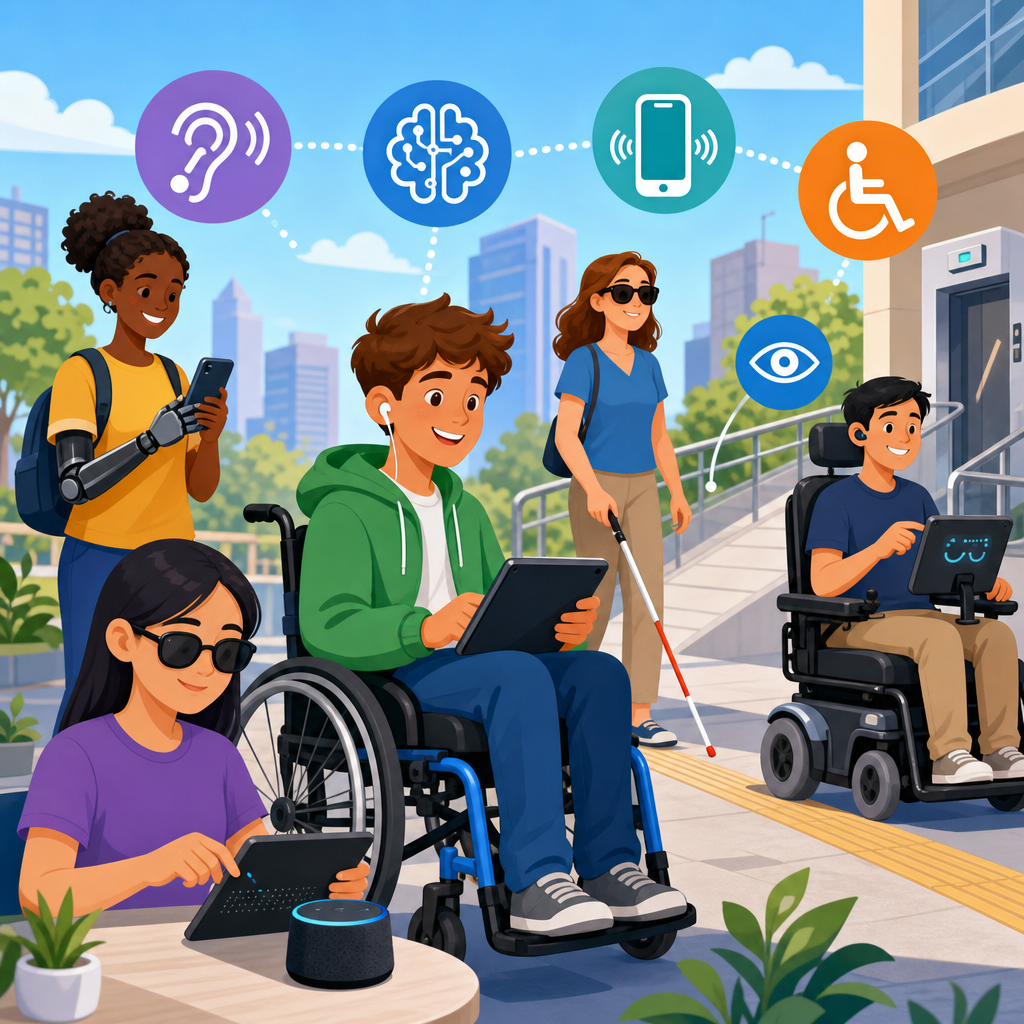
Technology has transformed accessibility from a narrow compliance concern into a practical system for participation, independence, and equal access. In the context of disability, accessibility means designing products, services, spaces, and digital experiences so people with physical, sensory, cognitive, neurological, or speech-related disabilities can use them effectively. Assistive technology refers to tools created specifically to support disabled users, while accessible technology includes mainstream devices and software designed to work for a wider range of abilities from the start. Together, they shape how people communicate, learn, work, travel, manage health, and engage with public life.
I have worked on accessibility projects across websites, mobile apps, document systems, and workplace technology rollouts, and the same lesson appears every time: accessibility is not a niche feature. It is a core design requirement that improves outcomes for millions of people, including older adults, people with temporary injuries, and users in difficult environments. A caption helps a deaf viewer, but it also helps a commuter in a noisy train station. Voice input supports someone with limited dexterity, but it also helps a driver navigate hands-free. Good accessibility design scales beyond one user group.
The importance of technology in enhancing accessibility is easy to see in daily life. Screen readers convert digital text into speech or braille for blind users. Speech recognition lets people dictate messages, control devices, and complete tasks without typing. Hearing aids and cochlear implant processors now connect with phones through Bluetooth Low Energy. Wheelchair users can operate smart home controls with switches, eye gaze systems, or voice assistants. Students with dyslexia use text-to-speech, reading overlays, and structured note-taking tools to reduce cognitive load. These are not abstract innovations; they are practical systems that directly affect independence, employment, and education.
Accessibility also matters because disability is common. The World Health Organization estimates that more than one billion people worldwide live with some form of disability. That makes accessible technology a market reality, a legal responsibility, and a social obligation. Standards such as the Web Content Accessibility Guidelines, the Americans with Disabilities Act, Section 508 in the United States, and EN 301 549 in Europe shape how organizations build and buy technology. For anyone exploring the basics of technology and accessibility, the central idea is simple: technology enhances accessibility when it reduces barriers, supports multiple ways of interacting, and gives disabled people control over how they access information and environments.
What Technology and Accessibility Mean in Practice
Technology and accessibility intersect wherever a person needs to perceive information, understand it, navigate an interface, input a response, or receive feedback. In practice, that means accessible systems must support different modes of interaction: visual, auditory, tactile, and voice-based. A well-designed banking app, for example, should work with screen readers, allow keyboard navigation, provide high contrast, label form fields clearly, avoid time-limited interactions without warning, and present error messages in text rather than color alone. Accessibility is achieved not by one feature, but by a stack of design choices working together.
It helps to divide the landscape into two categories. First, there is assistive technology, including screen readers like JAWS, NVDA, and VoiceOver; magnifiers such as ZoomText; alternative input devices; refreshable braille displays; augmentative and alternative communication devices; and environmental control systems. Second, there is accessible mainstream technology, including smartphones with built-in accessibility settings, operating systems that support captions and voice control, websites coded semantically, and appliances integrated with accessible smart home platforms. The strongest accessibility outcomes happen when mainstream technology works smoothly with assistive technology, because users should not need a custom workaround for every task.
The phrase exploring the basics of technology and accessibility should start with a key principle: disability is often created by barriers, not by a person’s condition alone. A blind user is disabled by an unlabeled button more than by blindness itself. A wheelchair user is disabled by a building without an elevator more than by the chair. A person with attention-related disabilities is disabled by cluttered interfaces, inconsistent layouts, and flashing content. Technology enhances accessibility when it removes those barriers through flexible design.
Core Categories of Accessible Technology
Accessible technology spans many disability groups, and understanding the main categories gives this hub article its foundation. For visual disabilities, common tools include screen readers, optical character recognition, magnification software, braille displays, and object recognition apps such as Seeing AI or Envision. These systems turn visual information into speech, enlarge critical elements, or identify products, text, and scenes through computer vision. Modern smartphones are especially important because they combine camera-based assistance, navigation, communication, and payment tools in one accessible platform.
For hearing disabilities, technology includes hearing aids, cochlear implants, telecoil-compatible systems, real-time captioning, visual alerts, vibration-based notifications, and video relay services. Automatic speech recognition has significantly improved live captions on platforms like Zoom, Microsoft Teams, and Google Meet, though accuracy still varies with accent, audio quality, and specialized terminology. In public venues, hearing loop systems can improve speech clarity for hearing aid users, but adoption remains uneven, which is why procurement and venue design matter.
For mobility disabilities, accessible technology covers alternative keyboards, eye tracking systems, switch access, head pointers, adaptive gaming controllers, powered wheelchairs, exoskeletons, robotic feeding devices, and voice control. Apple Switch Control, Windows Speech Recognition, and Android Voice Access allow users to operate devices without standard touch or mouse input. In my experience, the most effective implementations combine hardware support with customizable software settings, because mobility needs vary widely even within the same diagnosis.
For cognitive and learning disabilities, accessible technology includes text-to-speech, speech-to-text, simplified interfaces, task sequencing apps, symbol-based communication tools, reading support software, memory prompts, and distraction reduction settings. Microsoft Immersive Reader is a strong example because it adjusts spacing, highlights parts of speech, reads text aloud, and isolates lines to make reading more manageable. These features are often overlooked because they are less visible than screen readers, yet they are central to inclusive education and work.
| Disability Area | Common Technologies | Primary Benefit |
|---|---|---|
| Visual | Screen readers, braille displays, OCR apps, magnifiers | Access to text, navigation, and visual content |
| Hearing | Captions, hearing aids, loops, video relay | Access to speech and audio information |
| Mobility | Switch control, eye gaze, voice input, adaptive controllers | Alternative ways to control devices and environments |
| Cognitive | Text-to-speech, simplified layouts, reminders, reading tools | Reduced cognitive load and improved comprehension |
| Speech | AAC devices, speech generation apps | Reliable communication and participation |
How Digital Accessibility Is Built
Digital accessibility depends on design and code decisions that can be tested, documented, and improved. On the web, semantic HTML is foundational because screen readers rely on headings, landmarks, lists, buttons, form labels, and table structure to communicate page meaning. Keyboard accessibility is equally important; if a user cannot move through a site without a mouse, the experience fails for many people with mobility impairments and blind users. Color contrast, focus indicators, alt text, transcript availability, caption quality, error prevention, and predictable navigation are also baseline requirements.
Established guidance exists for this work. WCAG organizes accessibility around four principles: content must be perceivable, operable, understandable, and robust. These principles are practical, not theoretical. Perceivable means images need text alternatives and video needs captions. Operable means every function should be available by keyboard and users must have enough time. Understandable means instructions, labels, and page behavior should be clear and consistent. Robust means content should work with browsers and assistive technologies now and in the future. Teams that map product decisions to these principles make better tradeoffs and catch defects earlier.
Testing matters because automated scanners only detect part of the problem. Tools such as axe, WAVE, Lighthouse, and Accessibility Insights are useful for finding missing labels, low contrast, or improper heading structure, but they cannot fully judge whether alt text is meaningful, whether tab order makes sense, or whether a checkout flow is understandable. That is why serious accessibility work includes keyboard-only testing, screen reader testing, zoom testing, and user research with disabled participants. In real projects, the difference between compliant and usable often appears only when people try to complete actual tasks.
Assistive Technology in Everyday Life
The best way to understand technology in enhancing accessibility for the disabled is to look at daily routines. A blind professional may use VoiceOver on an iPhone to read messages, identify a bank card with a camera app, navigate transit using GPS guidance, and join a meeting with accessible calendar prompts. A deaf student may rely on live captions during lectures, visual door alerts in a dormitory, and a note-sharing app that synchronizes with recorded audio. A person with cerebral palsy may use eye gaze software to compose text, smart home integrations to control lights and locks, and switch access to browse educational content. These are normal workflows, not exceptional scenarios.
Mainstream devices increasingly include accessibility features by default. iOS and Android offer screen readers, magnifiers, speech output, voice control, switch support, hearing device compatibility, and caption settings. Windows and macOS include narrator or voiceover functionality, zoom, dictation, and display adjustments. Smart speakers, while not perfect, can support users with mobility limitations by handling reminders, calls, media playback, and appliance control. The important shift is that accessibility is moving closer to the operating system layer, where it becomes more reliable and easier to personalize.
There are limitations. Automatic captions still make errors, especially with domain-specific language. Voice assistants may mishear speech patterns affected by disability. Touchscreen kiosks often remain inaccessible despite accessible mobile platforms. Battery life, internet dependence, software updates, and device cost can also create barriers. Accessibility technology works best when organizations plan for support, training, compatibility, and redundancy rather than assuming the presence of a feature guarantees equal access.
Why Inclusive Design and Standards Matter
Inclusive design is the practice of creating for a broad range of human ability from the beginning instead of retrofitting access later. This matters because retrofits are usually more expensive, less elegant, and less reliable. When product teams consider disabled users during discovery, wireframing, procurement, and quality assurance, accessibility becomes part of normal delivery rather than a crisis response. In my experience, the most successful teams treat accessibility like security or privacy: a non-negotiable quality attribute with clear ownership.
Standards help organizations make that shift. WCAG remains the most recognized benchmark for digital accessibility, while procurement frameworks like Section 508 and EN 301 549 influence government and enterprise purchasing decisions. Native platform guidance from Apple, Google, and Microsoft translates standards into implementation patterns. For physical products and environments, universal design principles, ISO standards, and local building codes shape how technology interfaces with the built world. These standards are not bureaucratic overhead; they provide a shared language for requirements, audits, training, and vendor accountability.
Business and public sector incentives are also strong. Accessible design expands audience reach, reduces legal risk, improves usability, and strengthens brand trust. Captions increase video watch time. Clear forms reduce abandonment. Keyboard shortcuts help power users. Better heading structure improves navigation for assistive technology and for everyone scanning a long page. Accessibility is often presented as a constraint, but in practice it is a quality multiplier when done well.
The Future of Accessibility Technology
Emerging technology is improving accessibility, but progress is uneven and needs careful evaluation. Artificial intelligence now powers image descriptions, live transcription, voice synthesis, predictive text, object recognition, and personalized interface adaptations. Computer vision can describe scenes and read labels aloud. On-device machine learning can reduce latency for speech recognition and hearing assistance. Haptic feedback is becoming more precise in wearables and navigation aids. Brain-computer interface research, though early, points toward new input pathways for people with severe mobility impairments.
At the same time, new technology can introduce fresh barriers. Poorly trained AI models may generate inaccurate image descriptions. Automated interfaces may remove user control. Virtual reality can present major accessibility challenges if motion, input, captioning, and spatial audio are not designed carefully. Biometric systems may fail for people with limb differences, facial differences, or certain neurological conditions. The future of technology and accessibility will not be defined by novelty alone. It will be defined by whether disabled people are included in design, testing, governance, and product strategy.
For readers using this page as a hub for technology and accessibility, the core takeaway is direct. Accessibility starts with understanding barriers, continues through standards-based design, and succeeds when technology supports real human tasks. Assistive tools, accessible mainstream products, and inclusive digital design all play distinct roles, but they work best together. If you are building, buying, teaching, or managing technology, start by auditing your current barriers, learning the relevant standards, and involving disabled users early. That is how accessibility moves from a feature list to meaningful access.
Frequently Asked Questions
What does accessibility mean in technology for people with disabilities?
In technology, accessibility means designing digital tools, devices, services, and environments so people with disabilities can use them effectively, independently, and with dignity. This includes individuals with physical, sensory, cognitive, neurological, speech-related, and multiple disabilities. Rather than treating accessibility as a special add-on, modern best practice sees it as a core design principle that improves usability for everyone. For example, captions help deaf and hard-of-hearing users, but they also help people in noisy environments. Voice controls support users with limited mobility, but they can also be convenient for hands-free operation.
Accessibility in technology can apply to websites, mobile apps, software platforms, public kiosks, communication tools, transportation systems, smart home devices, and workplace technologies. It involves thoughtful features such as keyboard navigation, screen reader compatibility, high color contrast, alternative text for images, adjustable text size, speech recognition, and predictable user interfaces. The goal is not only compliance with standards or laws, but meaningful participation. When technology is accessible, it removes barriers and allows people to learn, work, communicate, travel, and manage daily life more easily.
What is the difference between assistive technology and accessible technology?
Assistive technology refers to tools specifically created to help people with disabilities perform tasks that might otherwise be difficult or impossible. Examples include screen readers for blind users, hearing aids for people with hearing loss, alternative keyboards, eye-tracking devices, speech-generating devices, and power wheelchairs. These tools are often highly specialized and tailored to support specific functional needs. Their primary purpose is to increase independence, communication, mobility, learning, and participation in everyday activities.
Accessible technology, by contrast, refers to mainstream products and systems that are designed from the start to be usable by a wider range of people, including disabled users. A website built to work with screen readers, a smartphone with built-in voice control, or a video platform that supports captions and transcripts would be considered accessible technology. The distinction matters because accessible technology reduces the need for workarounds, while assistive technology fills important gaps and provides personalized support. In practice, the two often work together. For example, an accessible website becomes much more usable when paired with assistive tools like screen readers or switch devices. The strongest accessibility outcomes happen when inclusive design and assistive solutions are both considered.
How has technology improved independence and everyday life for disabled individuals?
Technology has significantly expanded independence by helping disabled individuals access tasks, services, and experiences that were once limited by physical or communication barriers. In the home, smart assistants, automated lighting, smart locks, and voice-controlled appliances can help people with mobility or dexterity limitations manage their environment more easily. In education, digital learning platforms with text-to-speech, captioning, note-taking tools, and flexible content formats support students with different learning and sensory needs. In employment, accessible software, remote collaboration tools, and adaptive input devices make it easier for many disabled professionals to perform their jobs and participate fully in the workplace.
Daily communication has also improved through video relay services, speech-to-text tools, augmentative and alternative communication devices, and real-time captioning. Navigation apps, GPS tools, and transportation platforms with accessible features have made travel and community participation more practical. For many people, technology does more than provide convenience; it creates access to education, healthcare, employment, social connection, and self-determination. That said, the impact depends on affordability, training, and whether products are designed inclusively. The most effective technology is not simply advanced; it is usable, reliable, and responsive to real-world needs.
What are some common examples of accessibility features in modern technology?
Many accessibility features are now built into everyday devices and software, making inclusive use more common than ever. Visual accessibility features include screen readers, magnifiers, high-contrast modes, scalable text, dark mode options, and text descriptions for images. For users who are deaf or hard of hearing, common features include closed captions, live transcription, visual alerts, hearing device compatibility, and adjustable audio settings. People with mobility disabilities may rely on voice control, switch access, on-screen keyboards, gesture alternatives, sticky keys, or customizable touch settings to interact with devices more comfortably.
There are also important accessibility supports for people with cognitive, neurological, and learning disabilities. These can include simplified interfaces, distraction-reducing reading modes, consistent navigation, reminder systems, plain-language content, text-to-speech, and options to slow down animations or reduce motion. On websites and apps, accessible design often includes semantic headings, keyboard-friendly layouts, clearly labeled buttons, descriptive links, and forms that are easy to understand and complete. These features may seem small individually, but together they determine whether a product is usable or frustrating. Good accessibility is usually the result of many design choices working together in a thoughtful, user-centered way.
Why is accessibility important beyond legal compliance or technical standards?
Accessibility is important because it directly affects whether people can participate fully in society. While laws, regulations, and standards play an essential role in setting expectations, accessibility should not be viewed only as a compliance checklist. At its core, it is about equal opportunity, inclusion, dignity, and practical access to modern life. When a product or service is inaccessible, disabled users may be excluded from basic activities such as applying for jobs, attending school, accessing healthcare, managing finances, or communicating with others. That exclusion can have serious social, economic, and personal consequences.
Beyond its ethical value, accessibility also improves quality, reach, and innovation. Organizations that design for accessibility often create better experiences for all users because clear interfaces, flexible controls, and multiple ways to access information benefit a broad audience. Accessibility can expand customer bases, strengthen brand trust, improve search visibility through better content structure, and reduce the need for costly redesigns later. Most importantly, it signals that disabled people are recognized as full participants, not afterthoughts. Technology has the power to remove barriers, but only when accessibility is treated as a foundational priority rather than a final adjustment.


