Accessible pedestrian signals are a core part of ADA accessibility standards because they translate traffic information into forms blind pedestrians can perceive, use, and trust at every stage of a street crossing. In practice, this topic sits within the broader system of sidewalks, curb ramps, detectable warnings, crosswalk geometry, and public rights-of-way, because no signal can compensate for a sidewalk network that is broken, confusing, or physically unsafe. When I have evaluated crossings with blind travelers and orientation and mobility specialists, the pattern has been consistent: the safest intersections combine predictable pedestrian routes, well-designed curb ramps, clear alignment, and accessible pedestrian signals that provide unambiguous information at the exact place and time it is needed. That combination matters because crossing a multilane street is a high-consequence task. Missing the walk interval by a few seconds, drifting outside the crosswalk because of a skewed curb ramp, or misidentifying which leg of an intersection has the signal can expose a person to turning traffic immediately.
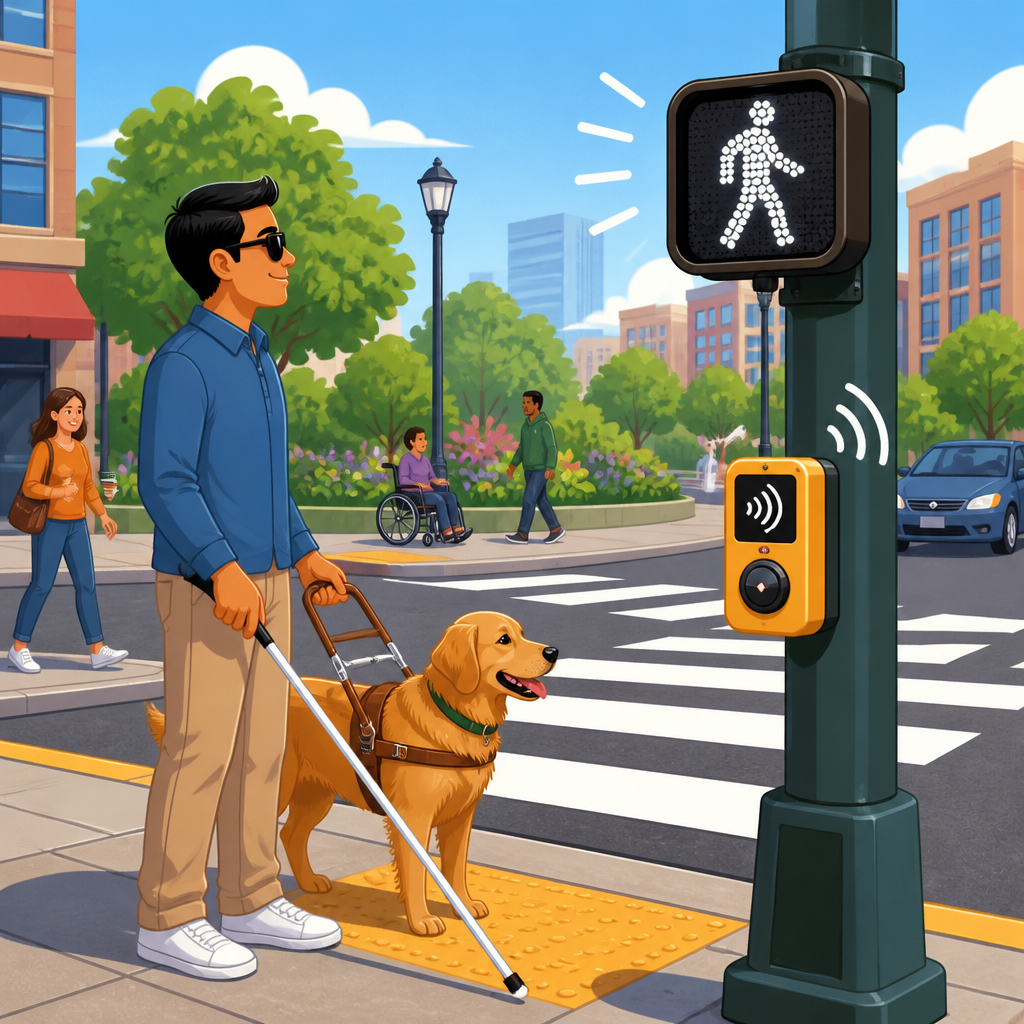
Accessible pedestrian signals, often shortened to APS, are devices that communicate the pedestrian phase through audible tones, vibrotactile features, locator tones, and pushbutton information. They are not simply speakers added to a traffic signal. Modern APS are integrated crossing systems designed to answer practical questions blind pedestrians ask at the curb: Where is the pushbutton? Which crossing does it control? Has the button been pressed? When does the walk interval begin? How much time remains? Is there a medians stage or a separate crossing phase? Federal guidance, especially the Public Rights-of-Way Accessibility Guidelines developed by the U.S. Access Board and the Manual on Uniform Traffic Control Devices, frames APS as part of an accessible route through the public right-of-way. That framing is important. It means cities must think beyond a single device and consider continuity from sidewalk to curb ramp to street crossing to receiving sidewalk.
This hub article explains the features blind pedestrians need, why some installations work better than others, and how sidewalks, curb ramps, and public rights-of-way affect the usefulness of every signalized crossing. It also identifies the design choices municipalities, engineers, and accessibility coordinators should prioritize when upgrading intersections under ADA transition plans or complete streets programs. If your goal is safer, more usable crossings, start with the principle that information must be perceivable, controls must be reachable, and the route itself must support independent travel.
Why accessible pedestrian signals must be designed as part of the pedestrian route
Blind pedestrians do not experience an intersection as isolated hardware. They approach it through a route that may include sidewalk obstructions, narrow clear widths, driveway crossings, grade changes, utility poles, bus stops, landscaping edges, and curb ramp transitions. If any of those elements are poorly designed, the signal becomes harder to find or interpret. For example, a locator tone is far less useful when the sidewalk is too narrow to allow a direct approach to the pushbutton, or when temporary signs force pedestrians into the furnishing zone. Likewise, an audible walk indication does not solve the problem of a diagonal curb ramp that aims a traveler toward the center of the intersection instead of the marked crossing.
In successful public rights-of-way design, the pedestrian access route is continuous, stable, and predictable. The cross slope is controlled so wheelchair users and blind pedestrians can maintain alignment. Vertical changes are minimized or beveled. Street furniture is placed consistently outside the clear path. Transit stops connect logically to crosswalks. At intersections, curb ramps line up with the direction of travel, detectable warning surfaces mark the boundary between sidewalk and street, and APS pushbuttons are mounted within reach range at locations that correspond clearly to a specific crossing. This systems approach matters more than any individual specification because blind pedestrians rely on layered cues. They may use cane feedback from the curb ramp flare, sound from parallel traffic, tactile information from detectable warnings, and APS features together. Remove one layer and the remaining cues become less reliable.
Sidewalk design also affects whether a crossing can be located independently. In districts with wide sidewalks, separated bike lanes, and floating bus stops, the route from building line to pushbutton can be complex. Without strong wayfinding cues, a blind pedestrian may locate the curb but miss the pushbutton entirely. That is why accessible sidewalk planning, not only intersection engineering, belongs at the center of ADA accessibility standards for public rights-of-way.
Core APS features blind pedestrians need at every signalized crossing
The most useful accessible pedestrian signals provide five essential functions. First, a locator tone helps the pedestrian find the pushbutton from the sidewalk approach. Second, the pushbutton gives tactile and audible confirmation that a call has been placed. Third, the device identifies which street crossing the button controls, typically through speech messages or equivalent information. Fourth, the walk interval is conveyed through a clear audible indication and a vibrotactile pulse. Fifth, the installation supports safe interpretation through proper placement, separation, and volume settings. These features work together. If one is missing, uncertainty rises immediately.
The locator tone is often underestimated, yet it is one of the most important features. A button mounted on a pole behind a planting strip, near a utility cabinet, or several feet from the curb line can be difficult to locate, especially in noisy urban corridors. A consistent locator tone lets the pedestrian home in on the exact control point. Once there, tactile arrows are critical. The arrow should align with the direction of travel on the corresponding crosswalk, not merely point in a general streetward direction. I have seen installations where both arrows on a corner felt nearly identical because the buttons were clustered too closely together; users had to guess which crossing each controlled. That is not an acceptable design outcome.
Audible and vibrotactile walk indications serve different but complementary purposes. Audible indications inform the user when the walk interval begins. Vibrotactile indications, usually a rapidly vibrating arrow, are invaluable in high-noise settings where traffic, construction, or weather can mask sound. Speech messages can identify the street being crossed or indicate special phasing conditions. They should be concise and accurate. Long spoken announcements can slow recognition, overlap with adjacent devices, and create confusion. Good APS communication is brief, distinct, and tied to a single actionable message.
| Feature | What it does | Why it matters for blind pedestrians |
|---|---|---|
| Locator tone | Emits a repeating sound at the pushbutton | Helps users find the control without searching along the pole line |
| Tactile arrow | Points in the crossing direction | Confirms which crosswalk the button serves and supports alignment |
| Pushbutton confirmation | Provides audible or tactile feedback after activation | Assures the user that the pedestrian call was registered |
| Audible walk indication | Signals the start of the walk phase | Conveys crossing opportunity when visual signals are inaccessible |
| Vibrotactile indication | Vibrates during the walk interval | Provides redundant information in loud or acoustically confusing settings |
Placement, separation, and signal timing determine whether APS information is usable
Even a technically compliant device can fail in the field if it is installed in the wrong place. Pushbuttons should be close to the curb ramp they serve, on an accessible approach, and separated enough that blind pedestrians can distinguish one crossing from another. The MUTCD and access guidance emphasize location because the user should not have to step into the street, weave around street furniture, or rely on guesswork to match a button to a crosswalk. When corners are tight, designers sometimes place two buttons on one pole. That can work only if there is clear tactile differentiation and speech information that prevents ambiguity. In many retrofits, separate poles produce better results.
Separation matters acoustically as well as physically. If adjacent APS devices are too close, the audible walk indications can blur together, especially at skewed intersections or where several crossings begin at once. Volume settings must respond to ambient sound without becoming environmental noise for nearby residents or businesses. Good systems use automatic volume adjustment so the message is audible when trucks pass but quieter late at night. The goal is intelligibility, not loudness. Excessive sound can actually reduce usability because it masks traffic cues blind pedestrians use to maintain orientation.
Timing is equally important. Pedestrian intervals must reflect actual walking speeds, crossing distances, median refuge conditions, and turning vehicle conflicts. Blind pedestrians often need every second of a properly calculated crossing time, especially at wide arterials with channelized right turns. Exclusive pedestrian phases may improve safety at complex intersections, but they also remove the parallel traffic surge some travelers use for orientation. In those cases, APS messaging and alignment features become even more important. Accessible timing is not only about extending clearance intervals; it is about matching the operation of the signal to the way pedestrians gather and confirm crossing information.
The relationship between APS, curb ramps, detectable warnings, and crosswalk geometry
Accessible pedestrian signals cannot be separated from curb ramp design. A blind pedestrian who receives a precise walk indication but starts from a ramp that is flared, warped, or aimed diagonally into the intersection still faces unnecessary risk. The best practice is straightforward: provide directional curb ramps or blended transitions that align with the marked crosswalk, pair them with detectable warning surfaces at the street edge, and locate APS where the relationship between ramp, button, and crossing is obvious. On large-radius corners, this often means careful geometric redesign rather than simply replacing old hardware.
Detectable warnings are another essential layer. Their purpose is to provide a tactile cue underfoot that the pedestrian is leaving the sidewalk and entering the vehicular way. For blind pedestrians, this boundary information supports decision-making at the exact point of departure. However, detectable warnings must be placed correctly. If they are set back too far from the curb line or interrupted by utility covers and patchwork paving, they become less reliable. I have walked sites where the warning surface was technically present but offset enough to create uncertainty about where the actual street edge began after resurfacing. Maintenance quality is therefore part of accessibility, not a separate issue.
Crosswalk geometry shapes the entire experience. Shorter crossings with tighter curb radii reduce exposure time. Median refuge islands can help, but only if they include accessible cut-throughs or ramps, detectable warnings, and APS information that makes two-stage crossings understandable. Skewed intersections require special attention because traffic sound may not align with the crossing direction. At those sites, tactile arrows, speech messages, and curb ramp orientation carry more weight than usual. The plain-language rule is simple: the physical shape of the corner should reinforce the signal message, never contradict it.
Common failure points in public rights-of-way and how cities should fix them
The most common failure points are not mysterious. Cities often inherit older intersections with narrow sidewalks, inaccessible pole locations, diagonal curb ramps, faded crosswalks, and signal timing built around vehicle throughput instead of pedestrian use. Construction projects may add another layer of problems when temporary pedestrian routes are not accessible or when APS is silenced without equivalent accommodation. In audits, I repeatedly see three avoidable issues: buttons that are too far from the curb ramp, devices that do not clearly identify the crossing they control, and sidewalk approaches blocked by signs, café seating, or utility work.
Fixing these conditions starts with a corridor-level inventory rather than isolated complaints. Municipalities should map curb ramp conditions, APS presence, sidewalk clear width, detectable warning condition, crossing distance, and proximity to transit, schools, medical facilities, and senior housing. That data helps prioritize upgrades where pedestrian demand and risk are highest. A downtown intersection near a rail station, for instance, may justify full signal modernization before a lower-volume residential crossing because the number of blind and low-vision users is greater and traffic complexity is higher. Prioritization is not about serving one disability group at the expense of another; it is about reducing the most severe barriers first.
Procurement and maintenance also matter. APS devices require calibration, periodic testing, and staff who understand both the technology and user experience. Public works crews should know how locator tones, tactile arrows, and volume adjustments function before resurfacing or pole replacement changes the site. Cities that involve blind pedestrians and orientation and mobility professionals in field review get better outcomes because they catch problems that plan sheets miss. A drawing may show a compliant reach range, yet a field test can reveal that a bus shelter panel blocks the natural approach to the button. That difference is exactly why real-world usability must guide ADA accessibility standards in public rights-of-way.
Building a complete accessible streets strategy
A complete accessible streets strategy treats APS as one component of a connected network. The network begins with continuous sidewalks, predictable surfaces, and compliant curb ramps. It extends through signalized crossings with clear information, median refuges that can be used independently, and maintenance practices that preserve accessibility after storms, paving, and utility work. For agencies, the practical framework is to embed accessibility in capital planning, standards manuals, temporary traffic control, and annual maintenance budgets rather than relying only on complaint response.
The key takeaway is direct: blind pedestrians need accessible pedestrian signals that are easy to find, easy to understand, and fully coordinated with sidewalks, curb ramps, and the geometry of the crossing itself. Locator tones, tactile arrows, audible walk indications, vibrotactile feedback, correct placement, and intelligible timing are not optional extras. They are the features that turn a traffic signal into a usable crossing aid. When those features are combined with aligned curb ramps, detectable warnings, clear pedestrian access routes, and thoughtful public rights-of-way design, cities create streets that support independent travel instead of forcing dangerous workarounds.
For transportation departments, consultants, facility managers, and advocates, the next step is simple: audit your sidewalk and crossing network as a system, prioritize high-need intersections, and upgrade each site so the route, the curb, and the signal all communicate the same safe path forward.
Frequently Asked Questions
What are Accessible Pedestrian Signals, and why do blind pedestrians need them?
Accessible Pedestrian Signals, often called APS, are pedestrian signal devices that communicate WALK and DON’T WALK information in nonvisual ways. Instead of relying only on the visual pedestrian display, APS provide audible tones, vibrotactile feedback, and locator features that help blind and low-vision pedestrians identify the pushbutton, understand when it is safe to begin crossing, and maintain confidence throughout the crossing task. They are an important part of ADA accessibility because a standard visual signal alone does not provide equal access to people who cannot reliably see the indication.
For blind pedestrians, the need is not simply “more sound.” The need is accurate, usable information at the right moment. A person approaching an intersection has to find the crossing location, determine which street is being crossed, know whether a pushbutton must be pressed, confirm when the WALK interval begins, and align properly before stepping off the curb. APS support each of those steps when they are properly designed and installed. Locator tones help users find the pushbutton. A tactile arrow shows the direction of travel associated with that button. A vibrotactile indication can confirm the WALK interval even in noisy environments. Spoken information or carefully differentiated sounds can identify which crossing has the WALK.
Just as important, APS reduce uncertainty. At many intersections, traffic patterns are complex, turning vehicles are common, and parallel traffic cues are not enough to interpret the signal phase reliably. Blind pedestrians should not have to guess whether a surge of traffic means they have a protected crossing opportunity or whether vehicles are moving under a different phase. APS make that information explicit. When installed as part of a complete accessible route that includes usable sidewalks, curb ramps, detectable warnings, and clear crosswalk geometry, they help create crossings that blind pedestrians can perceive, use, and trust.
What APS features matter most for blind pedestrians at a street crossing?
The most important APS features are the ones that provide clear, unambiguous information without forcing the pedestrian to interpret confusing sound patterns in a stressful traffic environment. A properly functioning locator tone is fundamental because it helps a user find the pushbutton independently. That matters more than many people realize. If the button cannot be located quickly, the rest of the system is already failing. The pushbutton should be placed where it can be reached from the pedestrian access route, and the locator tone should be audible enough to guide someone to it without becoming disruptive to nearby properties.
The tactile arrow is another critical feature. It tells the user which crossing movement that specific pushbutton controls. At corners with multiple poles, skewed crossings, channelized right turns, or medians, this directional information is essential. Without it, a blind pedestrian may activate one crossing and begin walking in another direction. The WALK indication itself should be available in both audible and vibrotactile form. Vibrotactile feedback is especially valuable in loud urban settings, near heavy trucks, construction, buses, or rain, when sound alone may be masked. Many users also benefit from speech messages that identify the street being crossed or indicate when the pushbutton has been successfully activated.
Timing and clarity also matter. The signal should communicate the beginning of the WALK interval promptly and consistently. If an intersection has an extended pushbutton press feature, such as audible street name information or a special crossing treatment, that feature should be intuitive and not interfere with basic operation. Good APS design also includes adequate separation between pushbuttons, so users can distinguish one crossing from another. In short, the best APS features are those that help with orientation, activation, confirmation, and direction of travel, all while fitting naturally into the broader accessible crossing design.
Can Accessible Pedestrian Signals make an unsafe or poorly designed intersection accessible by themselves?
No. APS are important, but they cannot fix a crossing environment that is fundamentally unsafe, physically inaccessible, or confusing. This is one of the most important points in any serious discussion of pedestrian accessibility. A blind pedestrian does not experience a signal in isolation. The crossing starts with the sidewalk network, continues through the curb ramp and detectable warning surface, and depends on crosswalk alignment, crossing distance, refuge space, drainage conditions, and the behavior of turning vehicles. If any of those elements are deficient, even excellent APS may only provide partial benefit.
For example, a locator tone does not solve the problem of a missing sidewalk connection. A clear WALK indication does not correct a curb ramp that points away from the crosswalk. A tactile arrow cannot compensate for a crossing so skewed that alignment is difficult and orientation is lost in the middle of the street. Similarly, if detectable warnings are absent or poorly placed, a blind pedestrian may not be able to identify the curb line and transition safely from the sidewalk to the street. If turning vehicles routinely encroach on the crosswalk, the signal information may be technically correct while the real-world crossing experience remains hazardous.
That is why APS should be viewed as one element in a complete public-rights-of-way accessibility strategy. The most effective intersections combine APS with continuous sidewalks, compliant curb ramps, properly placed detectable warnings, direct and visible crosswalks, manageable crossing distances, accessible medians or refuge islands, and traffic control measures that reduce conflict. In professional evaluations, the crossings that work best for blind pedestrians are not just the ones with sound; they are the ones where every part of the design supports clear decision-making and predictable movement from the approach to the far side landing.
How should APS be installed so blind pedestrians can actually use them effectively?
Effective APS installation depends on more than attaching devices to existing poles. Placement, orientation, separation, and consistency all influence whether the system is genuinely usable. Pushbuttons should be located on an accessible path, within reach range, and positioned so that a blind pedestrian can approach them without stepping into hazards, landscaping, or awkward obstructions. If there are two crossings at one corner, the buttons should be placed so the user can easily tell which one corresponds to each crossing. When buttons are too close together or badly aligned, confusion is common.
The tactile arrow must point in the actual direction of travel on the associated crosswalk. That sounds basic, but it is one of the most practical indicators of a quality installation. The arrow should not be treated as decorative or secondary. It is an orientation tool. Locator tones should be audible enough to guide pedestrians to the device but adjusted to avoid unnecessary noise impacts. Where speech messages are used, they should be clear and specific enough to identify the crossing or street name without creating information overload. Consistency across a corridor also helps; pedestrians should not have to relearn a different operating logic at every block.
Installation should also reflect the geometry of the intersection. Complex corners may require careful pole placement, separate devices, or additional design measures so that the user can understand which crossing phase is active. In some cases, accessible medians, longer crossing times, or protected signal phases are as important as the APS device itself. After installation, field testing with blind pedestrians is invaluable. A device may meet technical requirements on paper but still perform poorly in actual traffic noise, weather, or pedestrian flow. The goal is not merely compliance; it is practical usability under real conditions.
What should cities, engineers, and property owners prioritize if they want crossings to work better for blind pedestrians?
The priority should be a complete, connected, and understandable pedestrian environment, with APS integrated into that larger system rather than treated as a stand-alone fix. First, agencies should identify where blind pedestrians are most likely to need reliable nonvisual signal information: signalized intersections with complex phasing, wide crossings, significant turning movements, skewed geometry, or heavy ambient noise. Installing APS at those locations can make a major difference, especially when paired with upgrades to sidewalks, curb ramps, and detectable warnings.
Second, decision-makers should focus on design quality, not just equipment counts. It is better to install APS correctly at fewer intersections than to install devices widely but poorly. Crosswalk alignment, curb ramp placement, pushbutton location, and directional consistency all influence whether a crossing feels intelligible and safe. Maintenance must also be taken seriously. A broken locator tone, damaged arrow, silent pushbutton, or inaccessible route to the pole can effectively remove access. Accessibility is an ongoing operational responsibility, not a one-time capital improvement.
Third, agencies should include blind pedestrians and orientation and mobility professionals in planning, testing, and post-installation review. Lived experience often reveals problems that design teams miss, such as confusing sound overlap, poor button placement, or difficulty maintaining alignment through a wide crossing. Finally, cities should remember that trust is a core accessibility outcome. Blind pedestrians need crossings that provide dependable information every time, not systems that work only under ideal conditions. When APS are combined with sound sidewalk infrastructure, clear geometry, and consistent maintenance, they become a powerful tool for equal access in the public right-of-way.