Built-in elements shape whether a space is merely code-compliant on paper or genuinely usable for people with disabilities in everyday life. In ADA accessibility standards, built-in elements are the fixed components attached to a building or site, including benches, sales counters, dining surfaces, work surfaces, shelving, drinking fountains, coat hooks, handrails, grab bars, and fixed storage. Chapter 9: Built-In Elements in the 2010 ADA Standards for Accessible Design sets the technical rules for reach ranges, clear floor space, knee and toe clearance, heights, operable parts, and approach conditions that determine whether a person using a wheelchair, scooter, crutches, limited arm mobility, or short stature can use those features independently.
Testing built-in elements for ADA reach and approach compliance matters because small dimensional errors create large access barriers. A shelf mounted two inches too high may be unusable from a seated position. A counter with no clear knee space can block a forward approach. A drinking fountain placed near a projecting object hazard can satisfy one dimension while failing the user experience. I have seen projects pass a quick tape-measure review yet still frustrate visitors because the approach route was pinched by furniture, the operable parts required tight grasping, or the required clear floor space overlapped a door swing improperly. Effective testing combines measurements, observation, and practical use scenarios.
This hub article covers Chapter 9 comprehensively so readers can evaluate built-in elements with confidence and connect each requirement to field conditions. The core concepts are straightforward. Reach range refers to the vertical and horizontal zone a person can reasonably access. Approach describes whether the user reaches an element from the front or side and whether a wheelchair can position correctly. Clear floor space is the unobstructed area needed for maneuvering, typically 30 inches by 48 inches minimum. Knee and toe clearance allow a wheelchair footrest and knees to fit under a surface. Operable parts rules address controls, handles, and dispensers that must be within reach and usable without tight grasping, pinching, or twisting of the wrist.
Chapter 9 also matters as a hub topic because it ties directly to circulation, restrooms, assembly areas, dining spaces, lodging, transportation facilities, and workplace amenities. A built-in element is rarely tested in isolation. Its compliance depends on adjacent clearances, mounting conditions, protruding object rules, and the accessible route serving it. The most reliable audits use a repeatable method: identify the element type, confirm the applicable section, verify the required approach, measure the key dimensions, test operability, and document any conflicts with nearby features. When teams use that method consistently, they catch issues early, reduce retrofit costs, and create spaces that work in practice, not just in plan review.
What Chapter 9 Covers and How the Requirements Work Together
Chapter 9 in the ADA Standards addresses built-in elements in Sections 902 through 905. Section 902 covers dining surfaces and work surfaces. Section 903 addresses benches. Section 904 covers sales and service counters, food service lines, checkout aisles, and related surfaces. Section 905 addresses coat hooks and shelves. In real projects, these sections are often read alongside reach range requirements in Section 308, operable parts in Section 309, clear floor space in Section 305, turning space in Section 304, protruding objects in Section 307, and knee and toe clearance in Section 306. That cross-reference work is where many audits succeed or fail.
The important point is that Chapter 9 does not operate as a set of isolated height limits. Each built-in element must be reachable, approachable, and usable. For example, an accessible dining surface generally requires a surface height of 28 inches minimum and 34 inches maximum above the finish floor, plus clear floor space positioned for a forward approach, plus knee and toe clearance complying with Section 306. If the table height is right but the apron blocks knee clearance, the element fails. If the counter is the correct height but only reachable from a side approach blocked by fixed seating, the element fails. If the shelf is mounted low enough but a trash can permanently occupies the clear floor space, the practical result is still noncompliance.
I advise teams to think in layers. First, confirm the route: can a person get to the element on an accessible path without steps, abrupt level changes, or narrowed clear width. Second, confirm the setup space: is there a compliant clear floor space, and can it be positioned for the required approach. Third, confirm the geometry of use: height, depth, knee space, toe space, reach depth, and side obstructions. Fourth, confirm operation: can the user activate, grasp, or use the feature without excessive force or dexterity demands. This layered approach mirrors how people actually interact with built-in elements and prevents the common mistake of measuring only one dimension.
How to Test Reach Range and Approach Conditions in the Field
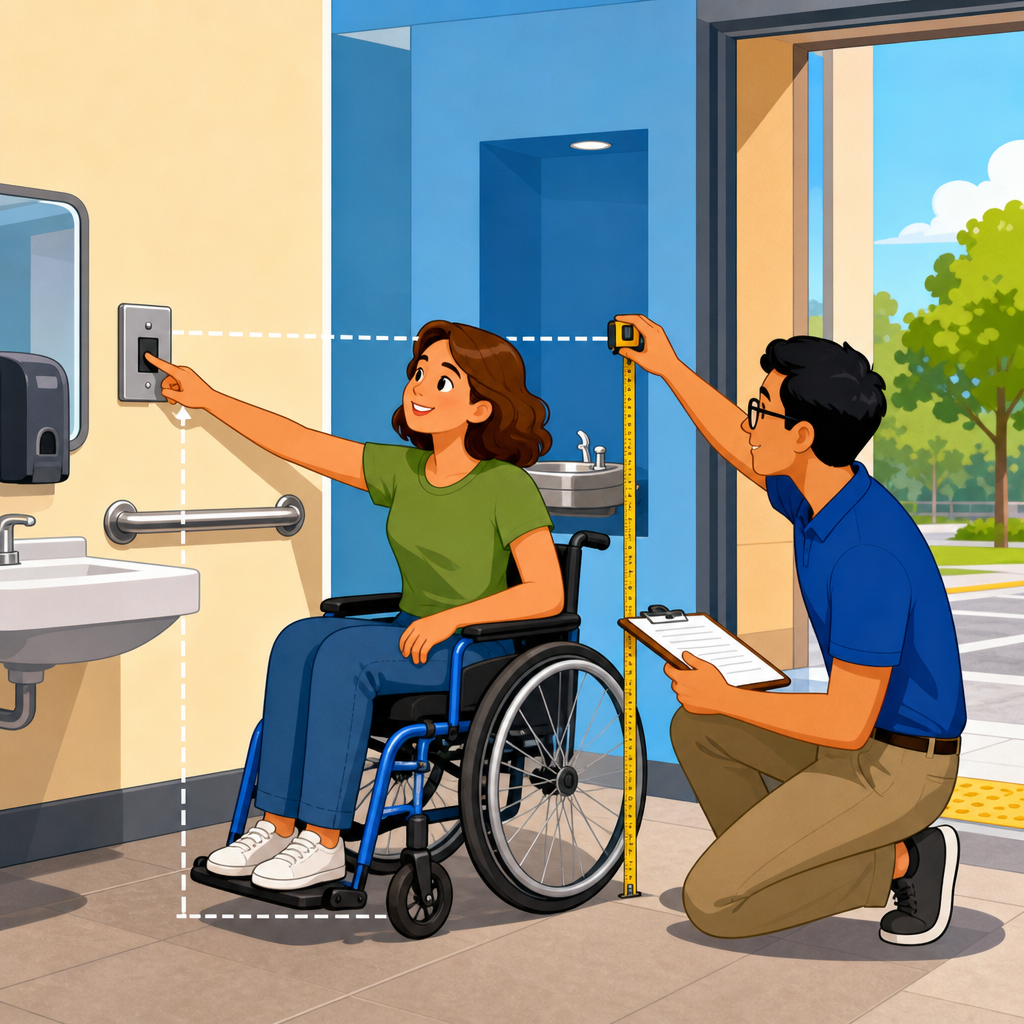
The field process should be disciplined and simple enough to repeat room after room. Start with the tools. A 25-foot tape measure, digital level, laser distance meter, door pressure gauge where needed, camera, and standardized checklist are enough for most built-in element audits. On complex sites, I also use blue painter’s tape to mark clear floor space and a rigid measuring stick to verify vertical heights quickly. Field notes should capture exact dimensions, not impressions such as “looks high” or “appears tight.” During litigation support or remediation planning, documented measurements are far more useful than photographs alone.
Begin each test by identifying the user position. Is the element intended for a forward approach, side approach, or either. Then identify the operative point. For a shelf, it may be the highest usable storage point. For a drinking fountain, it includes the spout outlet and controls. For a service counter, it is the transaction surface. Once those points are clear, measure the height above finish floor and the horizontal depth from the edge available to the user. Reach depth matters because a theoretically compliant maximum height can become too high if the user must reach over an obstruction. This is where Section 308 often becomes decisive, especially for side and forward reaches over counters or millwork.
Approach testing must include the clear floor space itself. Verify the 30-inch by 48-inch minimum area, then verify that it is actually usable. Door swings, base cabinets, planters, movable furniture that is effectively permanent, and floor-mounted accessories routinely compromise that space. In dining settings, I have found accessible tables selected correctly from a catalog but installed against walls so close that a wheelchair cannot center for a forward approach. In retail environments, low transaction counters are sometimes used as display space, defeating their intended function. In both cases, the dimensions on the cut sheet were not the problem; the installed conditions were.
| Element | Primary Checks | Common Failure | Practical Test |
|---|---|---|---|
| Dining or work surface | Height, knee clearance, clear floor space, forward approach | Apron or support blocks knees | Measure top height and underside clearance at use position |
| Bench | Seat height, depth, back support, clear space beside or at end | Armrests or walls block transfer space | Mark adjacent clear area and verify no fixed obstruction |
| Sales or service counter | Counter height, length of accessible portion, approach route | Accessible segment too short or used for storage | Measure linear accessible section and photograph active use area |
| Shelf or coat hook | Reach height, side/front approach, obstruction depth | Mounted within nominal height but beyond reach over casework | Measure height and horizontal reach over any obstruction |
Finally, test the element as a user would. Press the dispenser, hang an item on the hook, sign a receipt at the counter, sit at the bench, or simulate a wheelchair approach if possible. The ADA Standards are dimensional, but usability observations reveal conflicts dimensions alone can miss. A shelf may be technically reachable yet impractical because the top edge is sharp, the adjacent wall narrows approach, or the item stored there requires two-handed lifting from an awkward angle. Good auditors distinguish between minimum compliance and functional accessibility, and they document both.
Testing Dining Surfaces, Work Surfaces, and Benches
Dining surfaces and work surfaces are among the most frequently used built-in elements, and they are also among the easiest to misjudge. Under Section 902, the accessible surface height must be 28 inches minimum and 34 inches maximum. Clear floor space must be positioned for a forward approach, and knee and toe clearance must comply with Section 306 for the full width of the element required to be accessible. In restaurants, break rooms, libraries, classrooms, and hotel business centers, the most common failure is decorative support framing or shallow aprons that reduce usable knee clearance below what a wheelchair user needs. The top may look compliant while the underside is not.
Benches under Section 903 require more than checking seat height. A bench must provide a seat 20 inches minimum and 24 inches maximum in depth and 42 inches minimum in length. The seat height must be 17 inches minimum and 19 inches maximum above the finish floor. Where required, back support and structural strength matter, and the bench must have clear floor or ground space positioned at one end of the bench and parallel to the short axis. In locker rooms, transportation facilities, and fitting rooms, I often see benches recessed between walls or casework so tightly that transfer or side access becomes difficult even when the seat itself is dimensionally correct.
Real-world testing should include context. In a school cafeteria, an accessible table may technically comply but be isolated from the main seating cluster, creating social segregation. In a workplace lounge, an accessible counter-height work surface may be available, but power outlets and data ports may be mounted out of reach. In a park shelter, a built-in bench may comply in seat height yet sit on an unstable surface that compromises wheelchair positioning beside it. Chapter 9 compliance improves when teams view these elements as part of actual daily use patterns rather than standalone fixtures. The best projects place compliant options naturally within the primary experience, not off to the side as afterthoughts.
Testing Sales Counters, Service Counters, Shelves, and Coat Hooks
Section 904 is critical in banks, reception areas, hotel check-in desks, concession stands, retail stores, and food service lines. Accessible sales and service counters generally require a portion of the counter surface to be 36 inches maximum above the finish floor. Depending on the configuration, parallel or forward approach conditions may apply, and the accessible portion must be long enough to function for transactions, not merely symbolic. A common mistake is creating a lowered writing shelf that is too narrow for payment devices, paperwork, or merchandise exchange. Another is locating the lower section behind queue rails or display racks that obstruct approach.
Food service lines deserve careful testing because they combine multiple Chapter 9 and reach-range issues. Trays, utensils, condiments, beverage dispensers, sneeze guards, and payment terminals all affect usability. I have audited buffets where the transaction counter was compliant, but the plate stacks and beverage controls were placed beyond accessible reach. In self-service settings, the highest operable part and the reach depth over obstructions become especially important. Teams should measure from the finished floor to the control point, not just to the countertop, and they should consider whether side approach is blocked by fixed equipment or millwork returns.
Section 905 covers coat hooks and shelves. The straightforward rule is that coat hooks must be 48 inches maximum above the finish floor, and shelves must be 40 inches minimum and 48 inches maximum above the finish floor when accessibility is required. Yet installations frequently fail because designers mount them above benches, counters, or deep ledges that force a reach over an obstruction. In hotel guestrooms, schools, waiting rooms, and fitting areas, I regularly see hooks mounted at a nominally acceptable height measured from the floor while ignoring the fact that luggage racks, fixed seating, or cabinetry alter the actual reach condition. The correct test always considers both vertical height and horizontal reach conditions together.
Frequent Compliance Problems, Documentation, and Remediation Priorities
The most frequent Chapter 9 failures are predictable: inaccessible approach routes, missing clear floor space, incorrect mounting heights, insufficient knee clearance, inaccessible operable parts, and accessible portions repurposed for storage or display. Another recurring issue is design drift between drawings and installation. Millwork details often change during value engineering, field trimming, or equipment substitution. A transaction counter may gain a thicker top, a bench may receive taller legs, or a shelf may shift upward to align with other finishes. Each small change can push dimensions beyond allowable limits. That is why post-installation verification is essential even when the submittals looked correct.
Documentation should be systematic. For every element, record the room or location, applicable standard section, intended use, measured dimensions, observed barriers, and recommended corrective action. Include overview photos and close-up photos with a tape measure visible where practical. If the issue involves conflicting clearances, sketch the footprint and note how door swings, adjacent walls, or fixed furniture affect approach. This level of detail helps owners prioritize fixes and gives contractors a clear basis for remediation. It also supports consistency across a large portfolio, where similar counter details or bench types may recur in dozens of locations.
Prioritization should focus first on barriers that completely block independent use, then on barriers that materially reduce safety or dignity. A check-in counter with no accessible transaction surface is higher priority than a shelf mounted an inch high in a secondary area. A bench lacking usable transfer-side space in a locker room affects basic accommodation and should be corrected promptly. Some fixes are simple, such as lowering hooks, clearing the accessible counter segment, or replacing a payment terminal mount. Others require millwork reconstruction or relocation. The payoff is substantial: when built-in elements are tested carefully and corrected intelligently, facilities become easier to use for everyone. Review your Chapter 9 elements now, measure what users actually encounter, and create a remediation list that turns compliance into reliable daily access.
Frequently Asked Questions
What are built-in elements under ADA standards, and why are reach and approach tests so important?
Built-in elements are the fixed features attached to a building or site that people interact with during normal use of a space. Under the 2010 ADA Standards for Accessible Design, these can include benches, sales and service counters, dining and work surfaces, shelving, drinking fountains, coat hooks, handrails, grab bars, and fixed storage. Because these elements are not movable furniture, they directly affect whether a person with a disability can independently use the environment as intended. That is why testing them for both reach and approach is essential.
Reach addresses whether a person can access controls, shelves, hooks, dispensers, and similar features within allowable forward or side reach ranges. Approach addresses whether a person using a wheelchair, scooter, walker, crutches, or other mobility aid can actually position themselves correctly at the element. A feature may technically exist, but if there is not enough clear floor space in front of it, if knee or toe clearance is missing, or if surrounding obstructions force an awkward angle, the element may be unusable in real life.
In practice, this is where many accessibility problems show up. A counter may be installed at an acceptable height, but decorative panels underneath may block knee clearance. A coat hook may be mounted within a theoretical reach range, but a bench or planter may obstruct the required maneuvering space. A drinking fountain may appear compliant until measurement shows the spout location or controls require an overextended reach. Testing built-in elements for ADA reach and approach compliance helps verify not just whether dimensions appear correct on drawings, but whether the completed installation supports safe, independent, and dignified use.
How do you test approach requirements for built-in elements in an ADA review?
Testing approach requirements starts with understanding how a user is expected to interact with the element. The basic question is whether a person can get close enough, align themselves properly, and use the feature without obstruction. In many cases, that means checking for the required clear floor or ground space positioned for either a forward approach or a parallel approach, depending on the type of element and how it is designed to be used.
A thorough field review usually begins by measuring the clear space at the element and confirming that it is actually usable. The space should not overlap with door swings, protruding objects, floor-mounted accessories, or sloped surfaces that interfere with positioning. The reviewer should also look at the path leading to the feature. If a person cannot reach the clear floor space because of changes in level, narrow circulation routes, furniture placement, or other barriers, then the approach is not truly accessible even if the area directly in front of the element appears open.
For elements that require a forward approach, such as certain work surfaces, lavatory-adjacent accessories, or storage features, knee and toe clearance are often critical. If cabinetry, supports, modesty panels, or decorative trim block the lower area, the user may be prevented from pulling in close enough to use the feature. For elements intended for a parallel approach, such as some counters or shelves, the side positioning must still allow comfortable operation without twisting, overreaching, or colliding with adjacent obstacles.
Good testing also includes observing the surrounding context. Built-in elements are frequently affected by site conditions after construction. Trash receptacles, queue rails, merchandise displays, portable signs, and seasonal decorations can all compromise approach clearances. The most reliable ADA review checks the element as installed and in use, not just as designed. That is how you determine whether the approach supports actual accessibility instead of only nominal compliance.
What is the correct way to measure reach ranges for built-in elements?
Reach range testing focuses on whether operable parts or usable portions of a built-in element fall within accessible limits for a person approaching in a wheelchair. The proper method depends on whether the user approaches from the front or the side and whether any obstruction changes the reach depth. Reviewers should identify exactly what must be reached, such as a shelf edge, dispenser control, coat hook, transaction ledge, bottle filler button, or storage latch, and then measure to that functional point rather than to a nearby surface that is not actually used.
The next step is determining the reach type. A forward reach typically applies where the user faces the element directly, often with clear floor space centered on it. A side reach typically applies where the user pulls alongside the element. In both cases, the presence of counters, cabinetry, partitions, or other obstructions can affect the allowable reach depth and the maximum or minimum mounting height. Measuring only height is not enough. You also need to evaluate how far over or around the user must reach to operate the element. An item mounted at an otherwise acceptable height may still be inaccessible if it is recessed too deeply or placed behind a barrier.
Field measurement should be precise and consistent. Use a reliable tape measure or laser tool, confirm finished floor height at the actual location, and measure to the operable part or usable surface users must access. For example, with shelving, what matters is the highest shelf intended for public use, not simply the casework height. With coat hooks, measure the hook users must grasp, not the panel behind it. With a drinking fountain, evaluate the controls and spout position as used by the person approaching the unit.
It is also important to compare measurements against the applicable provisions in Chapter 9 and any related technical sections of the ADA Standards. Reach rules often work together with approach requirements, operable parts requirements, and clear floor space provisions. A complete review does not isolate one dimension from the others. It confirms that the user can approach the built-in element, reach the intended part, and operate it safely and independently.
Which built-in elements most often fail ADA reach and approach compliance in real projects?
Some of the most common trouble spots are sales counters, service counters, drinking fountains, fixed seating areas, work surfaces, and storage components. These elements are used constantly, and small design or installation errors can make a major difference in accessibility. Counters often fail because the accessible portion is too short, too high, or blocked underneath by casework, equipment, or decorative finishes. In retail and service settings, queue stanchions and point-of-sale devices are also frequent contributors to approach problems.
Drinking fountains are another recurring issue. Failures can involve incorrect spout height, inaccessible controls, insufficient clear floor space, or poor coordination with surrounding walls and alcoves. Bottle fillers and combination units deserve particular attention because added components may shift controls outside accessible reach ranges or create conflicts with the required user position. Fixed dining and work surfaces also commonly fail when they lack proper knee and toe clearance or when nearby furniture placement prevents a wheelchair user from approaching correctly.
Shelving and fixed storage frequently present reach issues, especially in libraries, break rooms, mercantile spaces, and hospitality settings. Designers may focus on aesthetics or storage capacity and overlook the need for accessible shelf heights and clear floor space at the usable portions. Coat hooks, lockers, and similar small built-ins are also often mounted too high, even though they seem minor. These details matter because they affect whether people can independently store belongings or use amenities available to others.
Benches, handrails, and grab bars tend to be thought of as straightforward, but they can still fail when dimensions are off, locations are poorly coordinated, or nearby walls and accessories interfere with use. The lesson across all of these categories is the same: ADA compliance depends on actual usability in the field. Even common built-in elements require careful measurement and verification after installation.
What is the best process for documenting and correcting ADA reach and approach problems with built-in elements?
The best process is systematic, evidence-based, and tied directly to the applicable ADA provisions. Start by identifying each built-in element that falls within the project scope and listing the specific technical criteria that apply. Then conduct a field review using consistent measurement methods, photographs, and notes on actual user conditions. Document the exact element location, the dimension observed, the required condition, and the way the noncompliance affects use. This creates a clear record that owners, designers, contractors, and compliance teams can understand and act on.
Strong documentation goes beyond saying that an item is “not ADA compliant.” It should explain whether the problem involves mounting height, clear floor space, knee clearance, side obstruction, forward reach depth, or another issue. It should also note whether the problem appears to result from design, installation, product selection, or operational changes after occupancy. That level of detail is important because the corrective strategy may differ. A coat hook mounted too high may be easy to relocate. A service counter with inadequate approach space may require millwork modification, equipment relocation, or a redesign of the surrounding layout.
When recommending corrections, prioritize solutions that restore independent use and align with the technical requirements of the ADA Standards. Avoid quick fixes that create new barriers, such as adding temporary signage to redirect users to a separate location when a simple physical adjustment could make the original element accessible. If multiple built-in elements of the same type are repeated throughout a facility, review all similar installations rather than correcting only one example. Repeated errors are common, especially with standardized millwork or fixture packages.
Finally, re-test after the correction is complete. ADA accessibility review is not finished when a contractor says an issue has been addressed