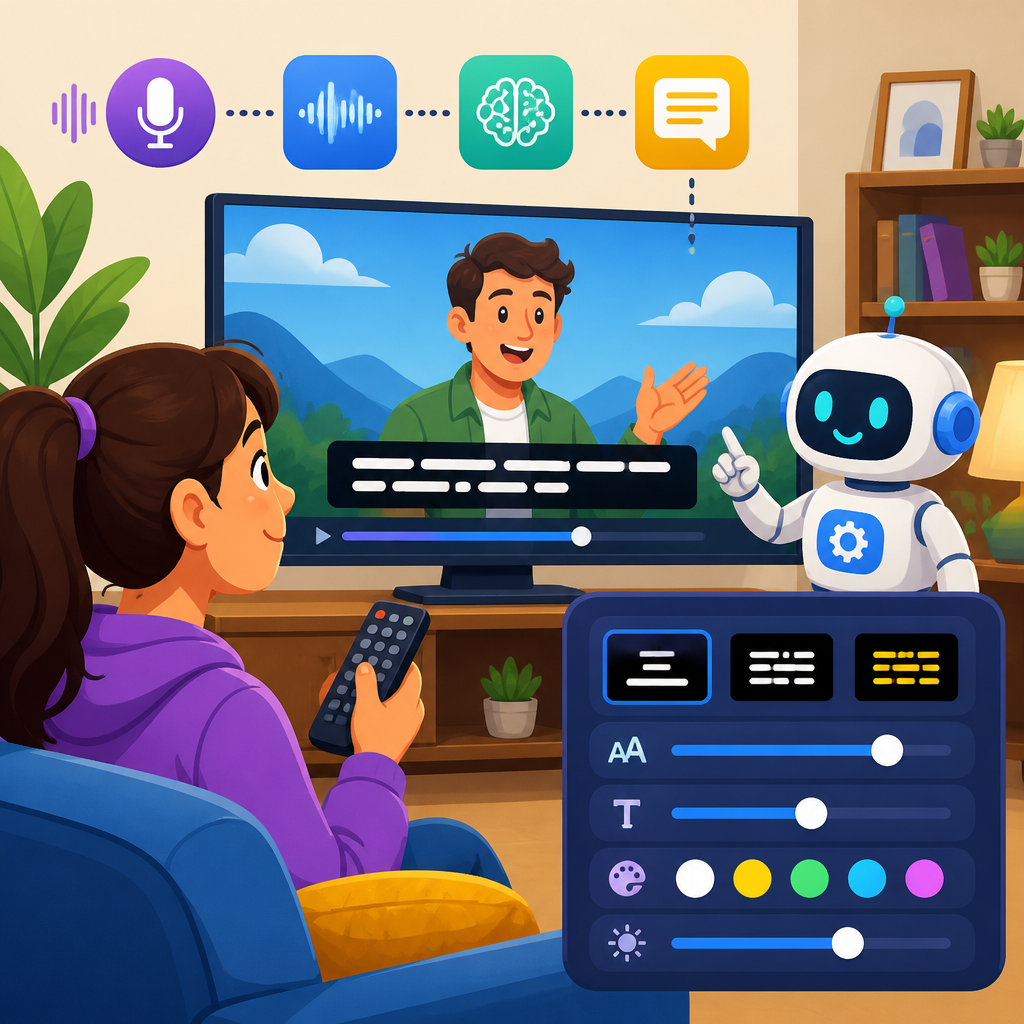
Caption processing technologies turn speech, sound cues, and timing information into readable on-screen text, while user controls let people tailor that text to match their hearing, vision, language, and attention needs. In accessibility work, this topic sits at the intersection of media engineering, user experience, and compliance because captions are not a single feature. They are a chain of processes: audio capture, speech recognition, speaker identification, punctuation restoration, timing alignment, quality review, delivery formatting, and presentation controls inside players, operating systems, and browsers. When any link fails, comprehension drops quickly.
I have worked on video publishing workflows where the difference between usable and frustrating captions came down to details that non-specialists rarely see: frame rate mismatches, poor microphone isolation, incorrect language models, and players that ignored user styling preferences. Those problems matter because captions support far more than deaf and hard-of-hearing viewers. They help people in noisy environments, second-language learners, users with auditory processing differences, people with temporary injuries, and anyone watching with sound off on mobile. Research from Ofcom, W3C guidance, and major platform studies has consistently shown that caption availability increases completion rates and improves comprehension when audio is constrained.
Key terms are worth defining clearly. Closed captions can be turned on or off by the user and may include non-speech information such as music cues or sound effects. Open captions are burned into the video and cannot be disabled. Subtitles usually translate dialogue for viewers who can hear the soundtrack but do not understand the language. Real-time captions are produced live, often through stenography, automatic speech recognition, or a hybrid approach. Offline captions are created or edited after recording, allowing higher accuracy and better timing. User controls include text size, font, color, background, opacity, window style, language selection, transcript access, and timing or positioning adjustments where supported.
This hub article explains advanced technology for accessibility through the practical lens of caption processing technologies and user controls. It covers how captions are generated, why quality varies across tools and contexts, what standards and formats govern delivery, how user controls change accessibility outcomes, and where organizations should focus if they want durable improvements instead of basic compliance. If you manage streaming media, training libraries, meetings, webinars, education platforms, or product video, understanding these systems will help you make better technical decisions and create content people can actually use.
How caption processing technologies work end to end
Caption processing begins before any algorithm runs. Audio quality determines a large share of caption quality, so source capture matters: directional microphones, separate speaker channels, consistent gain staging, and noise reduction produce cleaner inputs for both human captioners and speech models. In live environments, echo cancellation and acoustic treatment can be the difference between readable captions and streams of errors. Once audio enters the pipeline, automatic speech recognition converts speech to text by combining acoustic modeling with language modeling. Modern systems use deep neural networks and transformer-based architectures to predict words from audio frames, but they still struggle with overlapping speech, code-switching, uncommon names, heavy accents, and domain-specific terminology.
After transcription, downstream processing improves readability. Punctuation restoration inserts commas and periods. Diarization attempts to separate speakers. Named-entity handling identifies terms such as product names, medications, legal citations, or technical acronyms. Segmentation then breaks text into caption frames that fit reading speed constraints and line length recommendations. Timing alignment attaches in and out points to each caption so text appears when the corresponding speech occurs. In mature workflows, a human editor reviews the output, corrects errors, adds non-speech cues like [applause] or [door slams], checks synchronization, and exports the result in one or more delivery formats.
Different use cases require different processing choices. A university lecture benefits from a domain-specific vocabulary list and an accessible transcript linked to slide changes. A live sports broadcast needs low latency, even if wording is not perfect, because viewers must follow play-by-play action in real time. A compliance training video can accept slower turnaround in exchange for near-publishable accuracy and detailed sound descriptions. In each case, the goal is not simply text on screen. The goal is equivalent access to meaning, timing, and context.
Accuracy, latency, and the tradeoffs that shape caption quality
The most common question I hear is simple: how accurate do captions need to be? The practical answer is as accurate as possible, with enough timing precision and contextual detail that a viewer can follow the content without audio. Accuracy is affected by word error rate, but that metric alone is insufficient. A caption stream can have a decent aggregate score and still fail users if it drops negatives, technical terms, or speaker changes. For example, in healthcare content, confusing “hyperglycemia” with “hypoglycemia” is not a minor typo. In enterprise security training, “do not share credentials” becoming “do share credentials” reverses meaning.
Latency is the other major constraint. Live captioning systems often operate with a delay of a few seconds because audio must be buffered, decoded, and segmented. Human CART captioners can deliver strong accuracy but may require scheduling and higher cost. Fully automated live captions reduce cost and scale easily across meetings, yet performance varies by platform, language, and audio conditions. Hybrid models are increasingly common: AI generates the first pass, while a human monitor corrects critical errors in high-stakes events such as earnings calls, public meetings, or legal proceedings.
Reading speed, line breaks, and placement also influence quality. Standards bodies and accessibility specialists generally recommend concise segmentation that avoids splitting phrases unnaturally. If a sentence is chopped at the wrong point, readers must reparse meaning while the video continues. Placement can matter when on-screen text, sign language interpreters, or lower-third graphics occupy the same area. Good systems permit repositioning or at least use player-safe regions to reduce collisions. Quality, then, is a composite of lexical accuracy, synchronization, completeness, readability, and presentation.
Caption formats, standards, and delivery environments
Captions move through a technical ecosystem of formats, players, and standards. The most common web format is WebVTT, which works well with HTML5 video and supports cues, timing, and basic positioning. SRT remains popular because it is simple and widely supported, though it is less expressive. TTML and IMSC are used in broadcast and streaming workflows that need richer styling and interoperability. CEA-608 and CEA-708 remain relevant in television systems, especially in North American broadcast chains. Choosing the right format is not a clerical step; it affects styling, device support, conversion fidelity, and whether accessibility metadata survives distribution.
Standards provide the baseline for good implementation. The Web Content Accessibility Guidelines require captions for prerecorded synchronized media and set expectations for broader media accessibility. Media player behavior is shaped by browser support, operating system caption preferences, and platform-specific implementations from YouTube, Vimeo, Zoom, Microsoft Teams, Apple platforms, Android, and smart TV environments. In practice, I test captions across devices because nominal support can hide inconsistent rendering. A style that looks clear in one browser may become clipped on a television app. A language track that appears correctly in a desktop player may not be discoverable on mobile if the control labeling is weak.
Organizations also need reliable storage and version control. Source transcripts, edited caption masters, localized subtitle variants, and compliance records should be treated as media assets, not scattered attachments. When teams skip asset governance, outdated files are republished, translations drift from the source, and fixes never propagate consistently across platforms.
User controls that make captions genuinely usable
Caption availability is only the starting point. Users need controls because hearing, vision, cognition, language fluency, and viewing contexts differ widely. On platforms I have audited, a technically correct caption file still produced poor outcomes when text was too small, low contrast, fixed at the bottom over important content, or impossible to style. Effective controls include size scaling, font selection, character edge style, foreground and background color, opacity, caption window color, and language or track switching. Some systems also offer transcript search, adjustable playback speed, and persistent user preferences across sessions.
These controls matter for specific reasons. Larger text and thicker edges help viewers with low vision or small screens. Background opacity improves readability over complex imagery. Font choice can reduce crowding and improve character distinction. Separate language controls help multilingual households or learners compare original audio with translated text. Searchable transcripts support keyboard-only users and people who need to review terminology. When controls are exposed clearly and saved reliably, accessibility becomes adaptable rather than one-size-fits-all.
| Control | What it changes | User benefit | Implementation note |
|---|---|---|---|
| Text size | Caption scale | Improves readability on small screens and at distance | Respect OS-level caption settings where available |
| Color and contrast | Foreground, background, opacity | Supports low vision and complex video backgrounds | Test against WCAG contrast expectations |
| Font and edge style | Typeface, outline, shadow | Helps character recognition and reduces blur | Avoid decorative fonts; provide legible defaults |
| Language selection | Caption or subtitle track choice | Supports multilingual access and translation | Label tracks clearly with language and type |
| Transcript access | Full text outside the player | Enables search, review, note-taking, and navigation | Keep transcript synchronized to media timestamps |
The hardest part is not exposing controls in a settings panel. It is making sure those controls work consistently across browsers, apps, embedded players, and connected TVs. A polished accessibility experience requires integration testing, sensible defaults, and support for platform-level preferences rather than forcing users to reconfigure every player.
Automation, human review, and where advanced accessibility technology is heading
Advanced technology for accessibility increasingly means orchestration rather than a single tool. Automatic speech recognition has improved dramatically, especially for clear audio in major languages, but the best results still come from combining automation with human expertise and workflow discipline. Teams now use custom vocabularies, glossary injection, speaker profile training, confidence scoring, and quality assurance dashboards to raise performance. In education and enterprise content, I have seen accuracy improve significantly after teams fed product names, instructor rosters, and industry terminology into the transcription stage before recording sessions began.
Emerging systems also connect captions with adjacent accessibility layers. Real-time translation can generate same-language and cross-language text tracks from one source stream. Speaker labeling is improving in meetings where each participant has a separate microphone channel. Some players now sync captions with chapter markers, slides, or interactive transcripts so users can jump directly to a topic. Generative language models are being used for punctuation cleanup, summarization, and terminology normalization, but they require strict review because they can hallucinate content or smooth over uncertainty in ways that are unacceptable for legal, medical, educational, or safety-critical media.
There are real limitations to acknowledge. Low-resource languages still have weaker model support. Dialect handling remains inconsistent. Automated systems may perform worse for children’s voices, field recordings, or highly compressed streams. Privacy, retention, and consent are serious concerns when audio is routed through cloud services. Procurement teams should ask vendors about encryption, data residency, model training policies, and whether customer media is used to improve shared models.
The most effective caption strategy is straightforward: capture better audio, choose formats that fit your distribution environment, use automation where it saves time, add human review where mistakes carry real cost, and give users robust controls that persist across devices. That approach improves accessibility, comprehension, search visibility, and overall media quality at the same time. As a hub for advanced technology for accessibility, caption processing technologies and user controls offer a practical foundation for every related topic, from live events and online learning to product design and inclusive content operations. Audit your current media stack, test real user settings, and fix the weakest link first.
Frequently Asked Questions
1. What does “caption processing” actually include behind the scenes?
Caption processing is the full workflow that turns spoken audio and relevant sound information into synchronized on-screen text. It usually starts with audio capture, where the system isolates dialogue and other meaningful sounds from the media source. From there, speech recognition may be used to convert spoken words into text, followed by language modeling steps such as punctuation restoration, capitalization, and formatting so the captions read naturally rather than looking like a raw transcript. More advanced systems also attempt speaker identification, which helps viewers understand who is talking, and sound cue labeling, which adds context like “[music playing]” or “[door slams]” when those details matter to comprehension.
Timing is another major part of caption processing. Good captions do not simply display the right words; they appear at the right moment, stay on screen long enough to be read, and disappear cleanly so they do not overlap with later dialogue. Engineers often work with segmentation rules that determine how many words appear in each caption frame, how lines break, and how reading speed is managed across different devices. In high-quality accessibility workflows, caption processing also includes quality review, corrections, encoding into delivery formats, compatibility testing across players, and checks to ensure the final captions remain usable when streamed, downloaded, resized, translated, or customized by the user. In other words, captioning is not one tool or one file type. It is a chain of technical and editorial decisions that directly affects accessibility, usability, and legal compliance.
2. How do user controls improve caption accessibility for different people?
User controls make captions adaptable instead of one-size-fits-all, which is essential because people use captions for very different reasons. A deaf or hard-of-hearing viewer may need complete speech content plus non-speech sound cues to follow a video fully. A viewer with low vision may need larger text, stronger contrast, or a background box behind the captions to separate text from a busy image. Someone watching in a second language may benefit from slower playback combined with well-punctuated captions that are easier to parse. People with attention, processing, or cognitive differences may need cleaner line breaks, less visual clutter, and enough display time to read comfortably. User controls allow those adjustments without requiring a separate version of the content for every audience.
Common controls include font size, typeface, text color, background color, opacity, edge styling, caption window styling, placement, and sometimes language selection. Some platforms also support speaker labels, sound effect inclusion, transcript access, or preferences that persist across sessions. These controls matter because readability is affected by both personal needs and viewing conditions. For example, bright outdoor light, a small mobile screen, or fast-paced editing can make default captions difficult to use even for people who do not normally rely on them. Strong accessibility practice recognizes that user control is part of the product experience, not an optional extra. When controls are easy to find, keyboard accessible, screen-reader compatible, and responsive across devices, they help transform captions from basic compliance output into a genuinely usable feature.
3. What separates high-quality captions from captions that are technically present but hard to use?
High-quality captions are accurate, complete, readable, and well-timed. Accuracy means the words on screen closely match what is being said, including names, terminology, and important details. Completeness means captions do not omit meaningful dialogue or relevant sounds that contribute to understanding. Readability depends on punctuation, grammar, segmentation, and line length. A caption can contain the correct words and still be difficult to follow if lines break awkwardly, if text updates too quickly, or if there is no distinction between speakers. Timing quality matters just as much: captions should align closely with speech, remain visible long enough to read, and avoid lag that forces users to choose between watching the scene and catching the text.
By contrast, low-usability captions often reveal weaknesses somewhere in the processing chain. Automatic speech recognition may mishear words, especially with accents, overlapping speakers, background noise, or domain-specific vocabulary. Poor punctuation restoration can make speech appear flat and confusing. Bad timing can cause captions to flash too fast or trail several seconds behind the audio. Inadequate formatting can create giant text blocks, confusing line wraps, or captions that cover key visual information. A technically available caption track may satisfy a checkbox, but if users cannot read it comfortably or trust its content, the accessibility value is limited. This is why serious caption programs combine automation with human review, player-level customization, and quality assurance standards focused on actual user outcomes rather than simple feature presence.
4. Are automatic captions enough, or do they still need editing and review?
Automatic captions are useful, but in most cases they are only the starting point. Modern speech recognition systems can generate captions quickly and at scale, which is especially valuable for live events, large media libraries, and rapid publishing environments. They can dramatically reduce turnaround time and cost compared with fully manual workflows. However, automated output often struggles with real-world complexity. Background noise, multiple speakers, crosstalk, technical terms, brand names, accents, emotional speech, and inconsistent audio quality can all reduce accuracy. Automated systems may also miss non-speech audio cues, assign punctuation incorrectly, or fail to distinguish who is speaking, all of which can weaken comprehension.
Editing and review remain important because captions are an accessibility feature, not just a transcript generated for convenience. Human reviewers can correct wording, improve timing, insert meaningful sound descriptions, resolve speaker changes, and format captions for readability across devices. They can also identify whether the player respects user preferences such as text size and contrast, or whether the caption file behaves unpredictably in different browsers and apps. For live content, fully polished captions may not always be possible in real time, but even then organizations often use post-event cleanup to produce a more accurate on-demand version. The best approach is usually not automation versus humans; it is automation plus human oversight, guided by quality standards, user testing, and the specific accessibility risks of the content being published.
5. Why are caption processing and user controls important for compliance as well as user experience?
Caption processing and user controls matter for compliance because many accessibility laws, standards, and procurement requirements expect media content to be perceivable and usable by people with disabilities. In practice, that means organizations cannot rely on the mere existence of text if the captions are inaccurate, incomplete, poorly synchronized, or impossible to customize in ways users need. Compliance frameworks often intersect with broader technical standards and platform expectations, including support for accessible media players, keyboard navigation, sufficient contrast, and compatibility with assistive technologies. Since captions are delivered through a chain of systems rather than a single switch, compliance risk can arise anywhere in that chain: during creation, editing, encoding, playback, or user control implementation.
Just as importantly, strong captioning practices improve the overall user experience for a much wider audience than compliance language alone might suggest. Captions help people in noisy environments, quiet environments, multilingual settings, educational contexts, and mobile-first viewing situations. They support search, engagement, retention, and comprehension. User controls extend those benefits by letting individuals tailor presentation to their own hearing, vision, language, and attention needs instead of adapting themselves to rigid defaults. From an organizational standpoint, that means good caption systems are not only a legal safeguard; they are also part of inclusive design, product quality, and content reach. When teams understand caption processing as a media engineering and UX discipline rather than a box-ticking task, they are much more likely to build experiences that work well for real people in real conditions.


