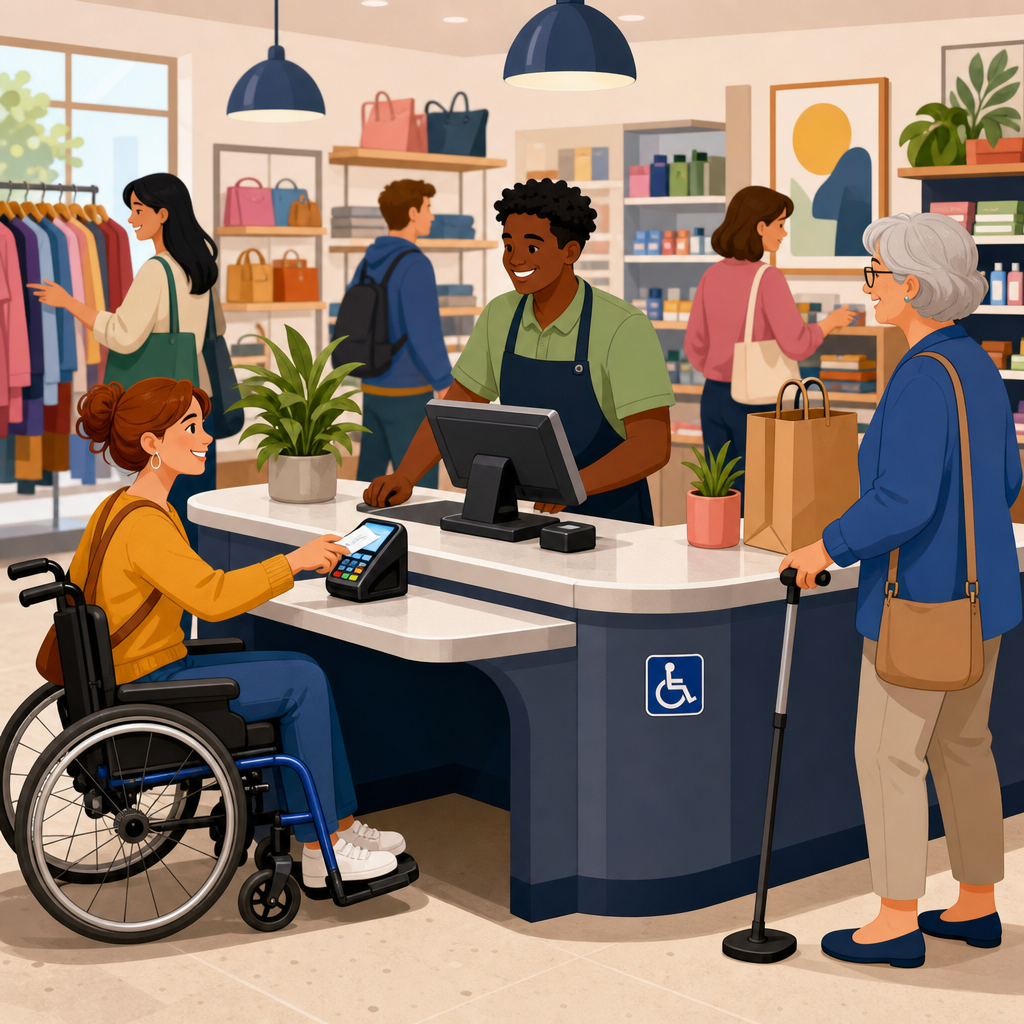
Accessible point-of-sale counter design shapes whether a busy retail space feels efficient, welcoming, and legally compliant for every customer. In practice, the point-of-sale counter is more than a checkout surface; it is a built-in element that affects reach range, knee clearance, communication, queue flow, payment access, and staff interaction. Under ADA accessibility standards, Chapter 9 addresses built-in elements, including sales and service counters that people use to complete transactions, ask questions, sign receipts, or pick up merchandise. For retailers, this chapter matters because checkout is the moment where accessibility failures become most visible. A shopper may navigate aisles successfully yet still be excluded if the counter is too high, the transaction ledge is too narrow, card readers are out of reach, or there is no clear floor space for a wheelchair user to approach.
I have worked on retail fit-outs where owners assumed a lower “accessible section” at the end of a long wrap counter solved everything. It rarely does unless the entire transaction sequence works. Customers need an accessible route to the station, enough maneuvering room in front of it, operable parts within reach ranges, and a surface that actually supports paying, signing, and receiving goods. Staff also need training so the accessible station is not blocked with bags, impulse displays, or returned merchandise. Good design prevents those failures before opening day.
Accessible point-of-sale counter design matters beyond compliance because it directly affects speed, dignity, and sales conversion in busy stores. Retail environments create pressure: lines build, customers carry bags or children, and staff multitask. When checkout stations are designed correctly, they reduce friction for wheelchair users, people of short stature, customers with limited hand dexterity, and older adults who need stable support while paying. They also improve usability for everyone. This hub article explains how Chapter 9 applies to sales and service counters, what dimensions and planning principles matter most, where retailers commonly get details wrong, and how to connect counter design decisions to adjacent built-in elements throughout the store.
What Chapter 9 Covers in Retail Counters and Why It Sets the Baseline
Chapter 9 focuses on built-in elements, meaning fixed components integrated into the architecture or millwork of a space. In retail settings, that includes sales counters, service counters, ticketing desks, pick-up stations, and other permanent transaction points. The core requirement is not abstract fairness; it is measurable usability. A built-in sales or service counter must include an accessible portion. In most retail applications, that accessible portion is typically 36 inches maximum above the finish floor and at least 36 inches long. It also must be positioned on an accessible route and served by clear floor space. Those numbers matter because they allow a customer using a wheelchair to approach, conduct the transaction, and depart without relying on staff workarounds.
The distinction between a decorative ledge and a true sales surface is important. I have seen projects with a lowered writing shelf attached to a tall cashier desk and presented as compliant. Inspectors and access consultants usually reject that approach when the actual exchange of payment, paperwork, or goods happens at the inaccessible height. The accessible portion must function as the real transaction area, not a symbolic appendage. If a customer can reach the lower surface but the scanner, signature device, receipt printer, or bagging zone remain beyond reach, the design still fails in practical terms.
Retailers should also understand that Chapter 9 does not operate in isolation. Counter compliance intersects with accessible routes, floor space requirements, operable parts, reach ranges, protruding object rules, and communication access. A beautifully dimensioned counter can still be unusable if queue stanchions narrow the approach or merchandise bins encroach into knee space. For that reason, this hub article should be read as the anchor page for all built-in retail elements that support customer transactions.
Core Dimensions for an Accessible Point-of-Sale Counter
The most frequently asked question is simple: how high should an accessible checkout counter be? For a parallel approach at a sales or service counter, the accessible portion is generally 36 inches maximum in height and 36 inches minimum in length. That gives enough width for payment devices, receipts, and product transfer without forcing an awkward side reach. In dense urban stores, designers sometimes try to shrink that length to preserve queue space. That usually creates operational problems because cash drawers, scanners, and impulse displays consume the lowered area. The result is an accessible segment that exists on paper but not in use.
Depth matters too. A compliant height alone is not enough if the customer cannot comfortably place items, sign a receipt, or stabilize a wallet. The clear floor space in front of the counter must support a forward or parallel approach as required by the layout. Where a forward approach is provided, knee and toe clearance become critical. Where a parallel approach is intended, the counter edge, card reader position, and bag handoff must remain within reach ranges. I typically advise retailers to think in sequences: approach, pause, pay, sign, receive, and exit. Each step should work from the same accessible station.
| Counter Design Element | Common Standard or Best Practice | Why It Matters in Busy Retail |
|---|---|---|
| Accessible counter height | 36 inches maximum above finish floor | Allows usable transactions for wheelchair users and shorter customers |
| Accessible counter length | 36 inches minimum | Provides enough space for payment, receipts, and merchandise transfer |
| Accessible route | Continuous route without steps or blocked turns | Ensures the station can actually be reached during peak traffic |
| Clear floor space | Positioned for required approach and maneuvering | Prevents crowding by queue rails, displays, or floor stacks |
| Operable parts | Within accessible reach ranges and usable with one hand | Makes card readers, call buttons, and signature devices functional |
| Knee and toe clearance | Needed where forward approach is intended | Supports closer positioning and easier payment interaction |
These dimensions are minimums, not ideal targets. In high-volume retail, a slightly longer lowered surface often performs better because it gives staff room to keep the accessible section clear. Grocery service desks, pharmacy pick-up counters, and returns stations especially benefit from extra length. The operational lesson is consistent: minimum compliance should be treated as a starting point, then refined for actual customer behavior.
How Reach Ranges, Operable Parts, and Equipment Placement Affect Compliance
Most counter failures happen at equipment placement, not millwork height. Designers may specify a compliant surface, then place the card reader on a fixed pole beyond reach, angle the signature pad toward the cashier, or mount a receipt screen too high. Under ADA accessibility standards, operable parts such as payment terminals, buttons, pens on retractable cords, and customer-facing displays must be within accessible reach ranges and usable without tight grasping, pinching, or twisting of the wrist. If the terminal can swivel or be handed to the customer, that flexibility helps, but it should not become the only means of access.
I have seen this issue most often in convenience stores and apparel shops that retrofit existing counters. The owner purchases a modern EMV terminal, installs it at the far corner to protect it from damage, and unknowingly creates an excessive side reach over candy racks or acrylic sneeze guards. A better approach is to integrate the device location early in shop drawings. Mark exact mounting heights, cable paths, and swivel clearances. Test the setup with a wheelchair turning radius and a simulated transaction before fabrication begins.
Barcode scanners, bag wells, and impulse fixtures also deserve scrutiny. An accessible portion of counter should not double as a display platform for promotional bins, loose baskets, or stacked gift cards. Busy retailers often sabotage their own accessible station by using every flat surface for selling. That choice may add a few dollars in add-on sales, but it creates avoidable barriers and can expose the business to complaints or enforcement. The accessible counter must remain open and functional at all times, including seasonal peaks.
Queue Design, Circulation, and Clear Floor Space at Checkout
A counter can meet every dimensional requirement and still fail if the queue is poorly planned. In busy retail spaces, crowd pressure changes how accessible design works in real life. Stanchions, merchandise corrals, floor decals, and last-minute promotional towers often reduce maneuvering clearance in front of the accessible station. Customers using mobility devices need clear floor space to approach, align with the counter, and leave without reversing through a packed line. When a queue folds tightly in front of the lowered section, staff may redirect the customer or ask others to move, creating an unnecessary public barrier.
The practical fix is to design the accessible checkout as part of the queue system, not outside it. That means preserving a clear approach from the sales floor, maintaining turning space near the payment zone, and avoiding gate hardware or narrow openings that pinch the route. Big-box retailers usually handle this well because they model checkout throughput carefully. Smaller boutiques often struggle because every square foot feels valuable. Even in compact stores, however, a single properly planned accessible station usually performs better than multiple cramped stations with no functional approach.
Retailers should also account for temporary conditions. Holiday fixture creep is a common problem. Portable dump bins migrate toward checkout, line rails get adjusted during promotions, and package stacks accumulate beside the register. Accessibility should be part of opening and closing checklists, not only design drawings. If the clear floor space exists only on the day of inspection, the store is not truly accessible.
Built-In Counter Types: Checkout, Service, Returns, Pharmacy, and Pick-Up
Chapter 9 applies across several retail counter types, and each presents different design demands. Standard checkout counters prioritize rapid payment and bagging. Customer service counters support longer conversations, form completion, and problem resolution. Returns desks often require a stable writing surface and room for larger merchandise. Pharmacy counters combine transaction access with privacy, security glazing, and frequent seated or standing interactions. Buy-online-pick-up-in-store stations must allow quick verification and parcel handoff without placing packages beyond accessible reach.
These functions should shape the accessible portion. At a returns desk, for example, customers may need to place a box, sign a screen, and review a receipt. A 36-inch-long segment may technically comply, but a deeper, uninterrupted surface often works better. At a pharmacy, lowered counter sections should align with medication handoff and consultation, not just payment. If the accessible section sits away from the private consultation area, the experience becomes fragmented and less dignified.
Banks inside retail stores, ticket counters, and food-service transaction points inside department stores create similar issues. The lesson is that accessibility must track the actual service sequence. Wherever the customer exchanges information, money, or goods, the built-in counter should support that step directly. A lowered segment in the wrong place is not meaningful access.
Materials, Durability, and Visibility in High-Traffic Stores
Accessible design should hold up under heavy use. Counter edges need durable finishes that resist chipping from carts, baskets, and mobility devices. Laminate, solid surface, and stone can all work if detailing is thoughtful. Sharp projecting corners should be avoided, especially at lower heights where contact is more likely. Contrasting edge colors can help customers with low vision identify the transaction surface, while matte finishes reduce glare on payment screens and receipts.
Lighting is another overlooked factor. Customers need to read prompts, verify totals, and sign documents without strain. Bright backlighting behind the cashier can make customer-facing screens harder to see, especially for older adults. Even though Chapter 9 centers on built-in elements, successful point-of-sale counter design often depends on integrating lighting, acoustics, and wayfinding. In my experience, stores that combine a visible lowered section, clear signage, and good lighting reduce confusion for all customers, not only those with disabilities.
Acoustic conditions matter at service counters where longer conversations occur. Hard surfaces throughout checkout can amplify background noise, making it difficult for customers with hearing loss to understand staff. Retailers should consider sound-absorbing finishes nearby and, where appropriate, assistive listening support at service desks. Accessibility is strongest when the physical counter and communication environment are planned together.
Common Compliance Mistakes and How to Avoid Expensive Retrofits
The most common mistake is assuming one lowered slab solves the problem. In reality, inaccessible card readers, blocked approaches, merchandise stored under counters, and poorly positioned bagging areas cause most complaints. Another frequent error is confusing employee work surfaces with customer transaction surfaces. A cashier may operate comfortably at one level while the customer side remains too high or too far away. Drawings must clearly label the customer-accessible transaction area and all associated equipment.
Retrofits become expensive when millwork is fabricated before accessibility review. The best workflow is straightforward: confirm the governing ADA accessibility standards, verify state or local requirements, produce enlarged plans and elevations of every counter type, coordinate device mounting heights, and perform a mock transaction on site. Use a punch list before opening that includes accessible route clearance, counter height verification, card reader position, and field checks for obstructions. This process costs far less than replacing stone tops, moving electrical rough-ins, or defending a complaint after opening.
Another avoidable mistake is treating the accessible station as secondary. When staff direct every customer to the “regular” line and use the accessible station for storage, the business undercuts its own compliance. Operational policies should keep the station active, visible, and equivalent in service speed.
Using This Hub to Plan Connected Built-In Elements Across the Store
As a hub for Chapter 9: Built-In Elements, accessible point-of-sale counter design should connect to every other fixed customer interface in the store. The same principles apply when evaluating fitting room benches, service windows, drinking fountains, dining surfaces in hybrid retail concepts, and built-in display interaction points. Start with the customer task, then confirm route, floor space, reach range, operable parts, and usable surface dimensions. That method creates consistency across the entire environment.
The key takeaway is simple: an accessible sales counter is not a courtesy feature or a code checkbox. It is a functional transaction tool that must work under real retail conditions. When the accessible portion is correctly sized, correctly located, kept clear, and equipped for actual payment and merchandise exchange, the store becomes easier to use for everyone. Review each counter type in your portfolio, audit equipment placement, and update operating procedures so accessibility survives the rush, not just the inspection.
Frequently Asked Questions
What makes a point-of-sale counter accessible in a busy retail environment?
An accessible point-of-sale counter is designed so customers of varying mobility, reach, and communication needs can complete a transaction without unnecessary difficulty or assistance. In a busy retail environment, that means the counter must do more than simply provide a place to pay. It should include an accessible transaction surface at an appropriate height, clear floor space for approach, and enough knee and toe clearance where required so a customer using a wheelchair or mobility device can comfortably pull up and interact with staff. The design should also support convenient access to payment terminals, signature devices, bagging areas, and merchandise handoff points.
Accessibility also depends on how the surrounding area functions during peak traffic. If merchandise displays, stanchions, impulse-buy racks, or line management fixtures narrow the route to the checkout, an otherwise compliant counter can become difficult to use in practice. Good accessible design accounts for queue flow, sightlines, turning space, and staff positioning so the accessible portion of the sales and service counter remains easy to find and use. In short, an accessible POS counter combines code-based dimensions with practical usability, allowing customers to approach, communicate, pay, and leave with the same independence and dignity expected in any well-designed retail setting.
How do ADA standards apply to sales and service counters at checkout?
ADA accessibility standards treat sales and service counters as built-in elements, which means they must be designed with accessibility in mind from the beginning rather than addressed later as an afterthought. For point-of-sale applications, the rules generally focus on providing an accessible portion of the counter where transactions can occur. That accessible section must allow a customer to complete payment, exchange information, sign receipts if needed, and receive goods or documents in a manner that is usable by people with disabilities. Depending on the specific design and use, requirements may involve counter height, length of the accessible portion, forward or parallel approach, clear floor space, and the relationship of equipment placed on top of the counter.
In real retail settings, compliance is not just about the fixed countertop itself. Card readers, barcode scanners, customer-facing screens, PIN pads, and other devices must also be positioned so customers can reach and use them. A beautifully compliant counter can still create barriers if the payment terminal is mounted too high, too far back, or on an inflexible stand. Retailers should also remember that legal compliance and customer usability are closely connected. A design that satisfies ADA intent typically improves checkout speed, reduces awkward staff workarounds, and creates a more inclusive customer experience. Because layouts vary by store type, it is wise to review the applicable ADA provisions carefully and coordinate with experienced designers or accessibility specialists when planning new counters or renovations.
What dimensions and features should retailers prioritize when designing an accessible checkout counter?
Retailers should prioritize the dimensions that directly affect how a customer approaches and uses the transaction area. The accessible section of the counter should be low enough to support comfortable interaction and payment, and it should be long enough to function as a true service surface rather than a token lowered corner. Clear floor space in front of the accessible portion is equally important, since customers need room to approach either head-on or from the side, depending on the counter configuration. Where a forward approach is intended, knee and toe clearance become critical so wheelchair users can get close enough to reach payment devices and exchange items with staff.
Beyond core dimensions, several functional features make the counter substantially more usable. Payment terminals should be located within accessible reach ranges and ideally mounted on adjustable or extended arms. Lighting should be sufficient to support reading screens, receipts, and cash handling without creating glare. The countertop should have enough uncluttered area for placing a purse, shopping basket item, receipt, or card. Retailers should also think about edge detailing, durability, and visibility. Contrasting finishes can help customers identify the accessible station quickly, while rounded edges and resilient materials improve safety and longevity in high-volume settings. The most successful counters are those that satisfy technical requirements while still supporting speed, comfort, and intuitive use during busy checkout periods.
How can store owners maintain accessibility at the POS counter when the space is crowded and fast-moving?
Maintaining accessibility in a crowded retail environment requires both good design and day-to-day operational discipline. Even a compliant counter can become inaccessible if portable displays, promotional bins, shopping carts, queue ropes, or stacked merchandise block the approach route. Store owners should make it standard practice to keep the accessible counter area clear at all times, especially during promotional events and peak shopping hours when floor layouts tend to shift. Staff should be trained to recognize that the accessible portion of the counter is not overflow storage, a display area, or a place to temporarily park equipment.
Operational planning also matters. Queue lines should guide customers toward all available stations without hiding or obstructing the accessible checkout position. If one register is intended as the accessible location, it should remain open whenever possible or be clearly available when needed. Equipment placement should be reviewed regularly, since movable card readers, receipt printers, and bag stands often drift into less usable positions over time. Retailers that perform periodic accessibility walkthroughs tend to catch these issues before they affect customers. In busy stores, accessibility is not preserved by design alone; it is preserved by consistent management, staff awareness, and a commitment to keeping the checkout experience functional for everyone.
Why is accessible point-of-sale counter design important beyond legal compliance?
Accessible point-of-sale counter design matters because it directly shapes how welcome, independent, and respected customers feel during one of the most important moments in the shopping journey: completing a purchase. A checkout counter that is too high, too cramped, or poorly organized can turn a routine transaction into a frustrating experience. By contrast, an accessible counter supports smoother communication, easier payment, better physical comfort, and a more dignified interaction for customers with disabilities, older adults, people with temporary injuries, and even shoppers managing strollers, bags, or limited reach.
There are also clear business advantages. Inclusive checkout design can improve transaction efficiency, reduce staff intervention, and create a more consistent experience across customer groups. It sends a strong message that the retailer has considered real-world user needs rather than treating accessibility as a box-checking exercise. In competitive retail environments, those details influence customer trust, loyalty, and brand reputation. Accessible design often benefits employees as well, since a better-organized transaction area can support safer movements, clearer communication, and more ergonomic workflows. Ultimately, accessible POS counter design is good compliance practice, good customer service, and good retail strategy all at once.