ADA dining and work surface heights determine whether built-in counters, tables, and similar surfaces can be used comfortably by people who approach in wheelchairs, transfer from mobility devices, or need sufficient knee and toe clearance to sit close enough to work. In Chapter 9 of the 2010 ADA Standards for Accessible Design, these requirements sit within the broader rules for built-in elements, a category that also includes benches, sales counters, check-writing surfaces, and fixed seating-related features. I have applied these standards on restaurant renovations, municipal service counters, and office fit-outs, and the same lesson repeats every time: a surface can look generous yet still fail accessibility if its height, clear floor space, or supporting structure blocks a usable approach. Understanding ADA dining and work surface heights matters because these dimensions shape real independence. If a library study carrel is too high, a student cannot write comfortably. If a breakroom counter has no knee clearance, an employee may be forced to work from the side. If a café’s accessible table is buried in a circulation pinch point, technical compliance on paper does not produce meaningful access in practice.
The key terms are straightforward but important. A dining surface is a surface intended for eating or drinking, typically fixed or built in. A work surface is intended for tasks such as writing, computer use, sorting, or assembly. Built-in means attached in a way that makes the element part of the facility rather than movable furniture. The ADA standards regulate built-in elements because users cannot simply reposition them. Chapter 9 points designers to dimensional rules that interact with Chapter 3 on clear floor space, Chapter 3 on reach ranges, and Chapter 4 on accessible routes. In practical design review, I never check height alone. I check top height, knee clearance depth, toe clearance, width, forward approach, and whether the route to the element stays accessible throughout the room. That integrated review is what turns Chapter 9 from a list of dimensions into a usable design framework.
What Chapter 9 Requires for Dining and Work Surfaces
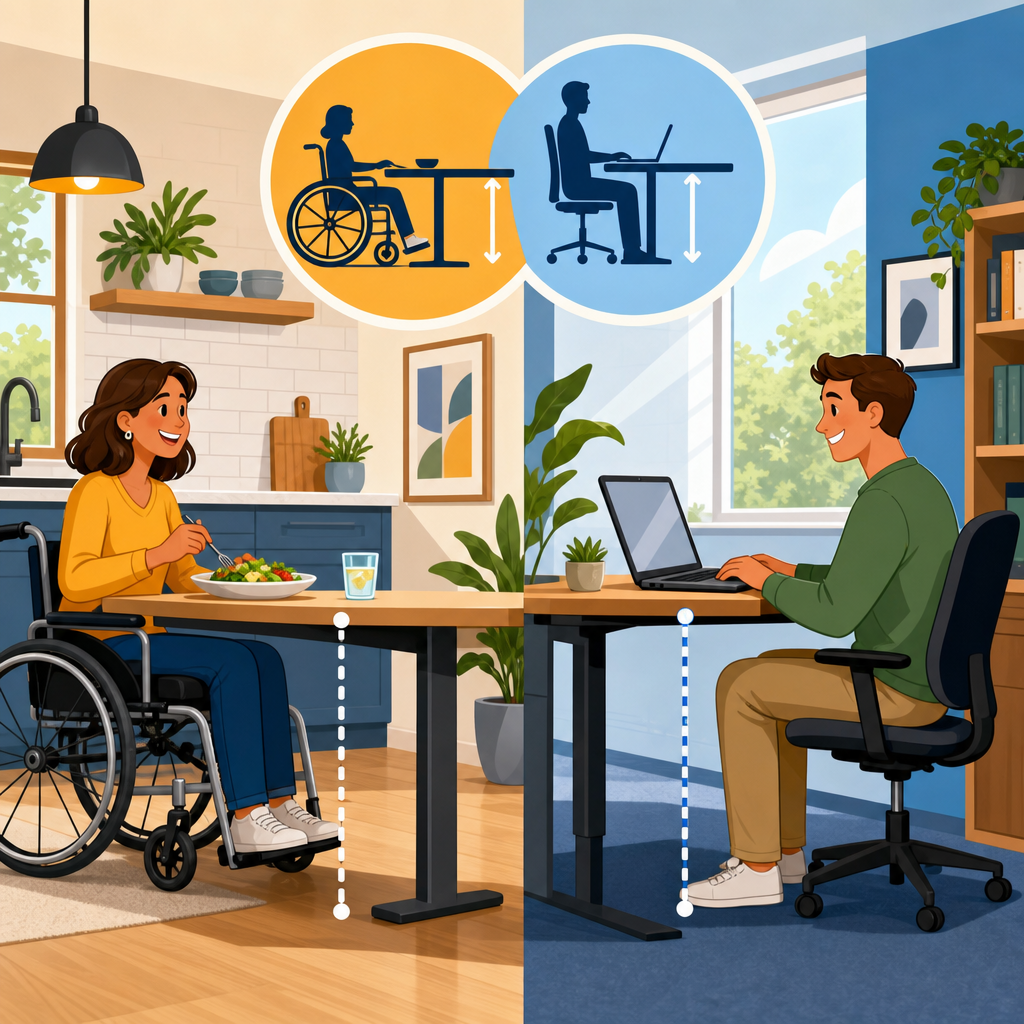
For built-in dining surfaces and work surfaces, the 2010 ADA Standards require compliance with Section 902. The accessible surface must be 28 inches minimum and 34 inches maximum above the finish floor or ground. It must provide a clear floor space positioned for a forward approach, along with knee and toe clearance that complies with Section 306. In plain terms, a wheelchair user must be able to pull up to the surface, place their knees under it, and work without twisting sideways or reaching over obstructions. At least 30 inches by 48 inches of clear floor space is needed, and the space cannot be occupied by chair legs, decorative panels, trash bins, or cabinetry hardware.
The most common field mistake is assuming a standard 36-inch-high counter can double as an accessible work surface. It cannot. Thirty-six inches exceeds the 34-inch maximum. Another common error is providing the right top height but using a support apron or drawer that steals knee clearance. Under Section 306, knee clearance must be at least 27 inches high minimum, 30 inches wide minimum, and 11 inches deep minimum at 9 inches above the floor, extending to 17 inches deep minimum at 27 inches above the floor. Toe clearance must extend 17 inches minimum under the element and be at least 9 inches high. Those dimensions are what make the height usable rather than merely nominally compliant.
Where multiple dining or work surfaces are provided, designers often ask how many must comply. The answer depends on whether the surfaces are fixed and part of the program. A restaurant with movable tables has different obligations than a built-in counter along a window wall. In Chapter 9, when the element is built in, at least 5 percent, but not fewer than one, of each type must comply in many related built-in element categories, and at least one accessible dining or work surface is typically the practical baseline. On projects I review, I advise clients to exceed the minimum where users are expected to remain for long periods, such as classrooms, libraries, and employee workrooms, because a single compliant position rarely supports actual choice, group seating, or operational flexibility.
How to Measure Height, Clearance, and Approach Correctly
Measurement errors cause many avoidable violations. Surface height is measured to the top of the finished surface, not to the underside and not before finish materials are installed. If a stone top and substrate raise the final elevation by an inch, the compliant drawing can become a noncompliant installation. Knee clearance is measured to the lowest projection under the surface, including brackets, rails, power modules, and support framing. I have seen beautifully detailed custom millwork fail because a concealed steel stiffener dropped into the knee space after permit review. Field verification matters.
Approach is just as critical as dimensions. The clear floor space must be positioned for a forward approach, meaning a wheelchair user can face the work surface directly. That space may overlap knee and toe clearance, but it cannot overlap inaccessible slopes, door swings that trap the user, or protruding fixtures. On renovation projects, the biggest challenge is often not the desk itself but the route to it. A compliant breakroom counter is useless if a 30-inch clear opening is reduced by a door closer arm, a vending machine, or furniture drift. In plan review, I recommend tracing the full user path from entrance to seating position before signing off on built-in elements.
| Requirement | ADA Rule | Common Failure | Practical Fix |
|---|---|---|---|
| Surface height | 28 to 34 inches AFF | Counter built at 36 inches | Lower a dedicated accessible section |
| Clear floor space | 30 by 48 inches minimum | Chair, trash can, or base cabinet blocks approach | Keep the approach zone permanently clear |
| Knee clearance height | 27 inches minimum | Drawer or apron reduces legroom | Remove obstructions below top |
| Knee clearance width | 30 inches minimum | Pedestal supports narrow the opening | Use side supports or cantilever framing |
| Toe clearance depth | 17 inches minimum | Decorative base closes underside | Recess base and preserve toe space |
Dining Surfaces in Restaurants, Cafeterias, and Breakrooms
Accessible dining surfaces show up in more places than restaurants. They are common in employee lunchrooms, school cafeterias, hospitality lounges, patient family areas, and residential amenity spaces. The rule remains consistent: when the dining surface is built in, at least one accessible position must offer the correct height and clearances. In a café banquette installation, for example, a fixed table anchored to the floor may need pedestal placement adjusted so a wheelchair user can pull in without striking the center support. At a hospital nourishment station, a built-in counter intended for seated eating must stay within the 28-to-34-inch range and connect to an accessible route.
Restaurants often misunderstand the difference between fixed and movable elements. Movable tables can help operators provide accessible seating flexibility, but they do not cure a noncompliant built-in counter line if that counter is itself part of the dining program. I have seen food halls install one compliant counter segment near the service queue while all window-facing dining ledges remained at 42 inches. That approach technically addresses some service-counter needs but not accessible dining choice. Good design distributes accessible dining locations so guests can sit with companions, enjoy equivalent views, and avoid being isolated at an edge condition.
Employee breakrooms deserve equal attention. The ADA does not stop at public accommodations; common-use employee spaces in many facilities must also be accessible. A fixed lunch counter with stools may need a lowered accessible section with knee clearance, nearby turning space, and enough width for side-by-side social use. In practice, the best breakroom layouts offer multiple accessible positions instead of a single token bay tucked beside the refrigerator. That approach reduces stigma and better matches real workplace patterns, where people gather in groups rather than one at a time.
Work Surfaces in Offices, Libraries, Schools, and Labs
Built-in work surfaces include study carrels, transaction writing shelves, fixed computer stations, classroom counters, maker-space benches, and built-in desks in hotel business centers. Section 902 applies broadly, but use type affects the detailing. In a library carrel, for example, privacy panels cannot intrude into the 30-inch minimum clear width. In a classroom, accessible work surfaces should be dispersed, not clustered at the back, so students have equivalent sightlines and instructor interaction. In offices, a built-in mail sorting counter that lacks knee clearance may exclude an employee from routine tasks even if an adjustable desk exists elsewhere.
Labs and technical environments require extra coordination. Designers sometimes assume accessibility is incompatible with casework, sinks, equipment rough-ins, and durable materials. That is wrong. It simply requires planning. I have coordinated accessible specimen processing counters with removable base cabinets, protected piping, and laminated worktops set at 34 inches maximum. In educational science labs, the challenge is often depth: equipment cords, backsplash details, and fixed shelving can force users to reach too far. A compliant height does not help if a microscope or task area sits beyond practical reach. That is why accessible design should be reviewed with actual user tasks in mind, not only dimensions.
Another overlooked issue is power and data. Built-in work surfaces increasingly include charging ports, cable grommets, monitor arms, and task lights. If those accessories project into knee space or require difficult reach, they compromise usability. Best practice is to locate outlets within reach range, preserve the underside clearances, and use cable management that stays outside the leg zone. On retrofits, this may mean wall-mounting power above the surface or routing wiring through side panels instead of the center knee space.
Related Built-In Elements in Chapter 9
Because this page is the hub for Chapter 9: Built-In Elements, it is important to place dining and work surfaces within the full subtopic. Chapter 9 also covers benches, check-out aisles, sales and service counters, queue lines, dressing rooms, and check-writing surfaces. These elements connect conceptually because they all shape how a person uses a facility when the feature cannot be moved. If you are auditing a project for Chapter 9 compliance, review them together. A municipal lobby, for example, may include an information counter, a writing shelf for forms, built-in waiting benches, and a transaction surface. Accessibility succeeds only when the whole sequence works.
Sales and service counters illustrate the distinction between transaction access and task access. A service counter may need an accessible portion for communication and exchange, while a nearby writing shelf or work ledge must satisfy the different criteria for usable work surfaces. Benches raise separate issues such as seat height, back support, and clear space adjacency. Queue lines affect whether users can even reach the compliant surface provided at the end. In field assessments, isolated compliance is a recurring problem: one element is designed correctly, but the connecting elements undo the benefit. Chapter 9 is best understood as a chain, not a checklist of unrelated parts.
This hub article should therefore guide deeper reviews of each subtopic. When teams ask where to start, I usually begin with the user journey: enter the room, navigate the route, wait if necessary, approach the element, use the surface, and depart safely. That sequence reveals conflicts faster than reading sections in isolation. It also helps owners prioritize corrections that produce immediate usability improvements, such as removing knee-space obstructions, lowering fixed counters, or widening the circulation path to built-in seating areas.
Common Compliance Pitfalls and Better Design Choices
The most frequent pitfall is treating the accessible section as an afterthought. When the lowered portion is appended awkwardly at the end of a counter run, users may encounter poor sightlines, blocked access, or social separation. Integrating accessible dining and work surface heights into the initial layout yields cleaner detailing and better user experience. Another common error is forgetting finish build-up. Flooring changes, countertop substrates, and edge profiles can all shift critical dimensions. Contractors should verify heights after rough framing and again before final sign-off.
Support conditions deserve scrutiny. Decorative legs, waterfall ends, storage cubbies, and modesty panels often intrude into the required 30-inch width or 17-inch toe depth. A cantilevered top or carefully located side supports usually solves the problem without sacrificing aesthetics. Material choice matters too. Thick live-edge slabs, for instance, can create an undulating underside that reduces knee clearance unpredictably. Durable, cleanable surfaces are important, but so is dimensional consistency. For public and commercial work, I prefer detailing that leaves tolerance room rather than aiming at the absolute limit.
Finally, avoid tokenism. Minimum compliance may satisfy enforcement, but inclusive design asks whether people can actually choose where and how to participate. In dining areas, provide more than one accessible location and vary seating options. In study zones, distribute compliant carrels near power, daylight, and quiet areas, not only at leftover perimeter spots. These decisions cost little when made early and pay off in usability, operational flexibility, and reduced retrofit expense later.
ADA dining and work surface heights are simple to state but consequential in practice: 28 to 34 inches high, with compliant clear floor space, knee clearance, toe clearance, and an accessible route. Chapter 9 matters because built-in elements cannot be moved out of the way or adjusted by the user, so the design itself must deliver access. When these standards are applied carefully, people can eat, write, study, work, and participate alongside everyone else without special assistance.
For this Chapter 9 hub, the main takeaway is to review built-in elements as a connected system rather than isolated dimensions. Dining surfaces, work surfaces, counters, benches, and related features all depend on the same fundamentals: usable approach, correct height, unobstructed legroom, and thoughtful placement within the room. The projects that perform best are the ones where compliance is coordinated during planning, millwork detailing, and field verification, not patched in at the end.
If you are designing, auditing, or renovating under ADA Accessibility Standards, use this page as your starting point for Chapter 9 and then review each built-in element category in detail. Measure what will be built, not what was intended, and prioritize layouts that provide real choice. That is how accessible design moves from code compliance to everyday usability for staff, visitors, students, patients, and diners.
Frequently Asked Questions
What does the ADA require for dining and work surface heights?
Under the 2010 ADA Standards for Accessible Design, accessible dining surfaces and work surfaces must be provided at a height of 28 inches minimum and 34 inches maximum above the finish floor or ground. This range is intended to allow people who use wheelchairs or other mobility devices to pull up close enough to eat, write, read, use a computer, or perform similar tasks comfortably. Height alone is not the full requirement, however. To function as an accessible surface, the element must also provide compliant knee and toe clearance underneath so a seated user can position their legs and footrests properly.
In practice, this means designers and facility owners should think of accessible usability as a combination of surface height, clear floor space, and usable approach. A table or built-in counter that falls within the 28-to-34-inch range but has obstructing supports, aprons, cabinets, or insufficient depth underneath may still fail to provide real access. The ADA addresses these requirements within the broader rules for built-in elements in Chapter 9, which is why dining and work surfaces are often reviewed alongside benches, sales counters, check-writing surfaces, and fixed seating.
How much knee and toe clearance is needed under an ADA-compliant dining or work surface?
Knee and toe clearance are critical because they determine whether a person can actually use the surface while seated in a wheelchair. Generally, the ADA requires knee clearance of at least 27 inches high minimum, 30 inches wide minimum, and 19 inches deep minimum. In addition, toe clearance must extend at least 17 inches minimum under the element. These dimensions allow space for a wheelchair user’s knees, lower legs, and footrests to fit beneath the surface rather than stopping too far away to use it effectively.
These clearances should be measured carefully and considered together with the surface height. For example, a built-in desk set at 29 inches high may appear compliant at first glance, but if a drawer, support bracket, or decorative panel reduces knee space below 27 inches high, the installation may not be accessible. The same issue can arise with restaurant counters, study carrels, or shared amenity tables where underside features interfere with a forward approach. Proper compliance depends on preserving the full usable space below the surface, not just meeting the top measurement.
Do all dining tables and work surfaces in a facility have to meet ADA requirements?
No. The ADA does not require every single dining table, counter, or work surface to be accessible in all cases, but a sufficient number must be provided so people with disabilities have meaningful, comparable access. The exact scoping can depend on the type of facility, the use of the space, and whether the surfaces are fixed or built in. For example, in dining areas, accessible seating and surfaces should be integrated into the overall layout rather than segregated into a single inconvenient location. In work or study environments, accessible surfaces should be available wherever users are expected to perform the same functions as others.
The most important principle is equivalent usability. If all standard built-in counters are installed at heights that exclude wheelchair users, the facility may deny access even if one distant or less desirable surface is technically compliant. Accessible options should be located on an accessible route, should serve the same purpose as other surfaces, and should be distributed in a way that supports normal participation. This is especially important in schools, offices, libraries, cafeterias, break rooms, and hospitality settings, where built-in elements are part of everyday use rather than a special accommodation.
What is the difference between a dining surface, a work surface, and other built-in elements under the ADA?
Dining surfaces and work surfaces are both built-in elements, but they are evaluated based on how people use them. A dining surface is generally intended for eating or drinking, such as a fixed table in a cafeteria, restaurant, or break area. A work surface is intended for tasks like writing, reading, assembling materials, using a device, or performing office or educational activities. Both are subject to similar height and clearance requirements because both must support a forward approach by a seated user.
Other built-in elements in Chapter 9 include benches, sales counters, check-writing surfaces, and fixed seating, each with its own technical and scoping rules. While these elements may seem similar, they are not interchangeable from a compliance standpoint. For example, a sales counter may have requirements tied to transaction access, while a work surface must support task use over a defined area. A bench addresses seating transfer and stability issues rather than under-surface clearance. Understanding the distinction matters because facilities often assume that any lowered counter qualifies as an accessible work or dining surface, when in reality the intended function and the dimensional details determine which ADA provisions apply.
What are the most common mistakes that make dining and work surfaces noncompliant with the ADA?
One of the most common mistakes is focusing only on countertop height while ignoring what happens below. Designers may install a surface within the 28-inch to 34-inch permitted range but then add cabinets, support legs, modesty panels, or thick aprons that block knee and toe clearance. Another frequent problem is failing to provide enough clear floor space for a wheelchair to approach the surface properly. Even a perfectly sized table can become unusable if it is placed too close to walls, furniture, or circulation paths that prevent positioning.
Facilities also run into trouble when accessible surfaces are not integrated into the primary experience. Examples include placing the only compliant dining surface in an isolated corner, locating the accessible work station away from the rest of the group, or designating a makeshift surface that does not offer the same function or convenience as standard options. In renovations, errors often happen when existing millwork is reused without checking current ADA dimensions. The best way to avoid noncompliance is to review height, knee clearance, toe clearance, width, depth, floor space, and route access together. Accessible design works when the whole user experience is considered, not when a single dimension is treated as the entire standard.